
The result in one table
| Test | Measured result | Practical meaning |
|---|---|---|
| Ethernet port 1, two directions | about 912 / 941Mbps | normal near-line-rate 1GbE |
| Ethernet port 2, two directions | about 891 / 903Mbps | normal near-line-rate 1GbE |
| Wi-Fi 6, near range | about 618 / 870Mbps | strong but environment-dependent |
| SMB 50GiB, two directions | about 107.15 / 102.95MiB/s | close to gigabit file-transfer ceiling |
| SMB 10,000 × 64KiB files | about 26.57 / 51.31MiB/s | metadata and security overhead visible |
| Integrity | SHA-256 matched; no missing small files | transferred data verified |
Beelink officially specifies the EQi12 with two Gigabit Ethernet ports. Windows identified two Realtek PCIe Gigabit controllers, Ubuntu Live used the r8169 driver for both, and the measured throughput matched the official 1GbE specification.
Why physical port mapping came first
Windows displayed two nearly identical Realtek adapter names. A friendly name ending in #2 is not a permanent physical label; driver reinstallations and device enumeration can change it. That matters for throughput, Wake-on-LAN, firewall rules and any plan to dedicate one port to storage or management.
We connected one cable at a time, recorded the active controller and link state, ran the transfer, then moved the cable to the other jack. The private inventory binds each controller’s hardware ID and MAC address to the physical port. Published screenshots keep the performance result while hiding the identifiers.
Wired test method
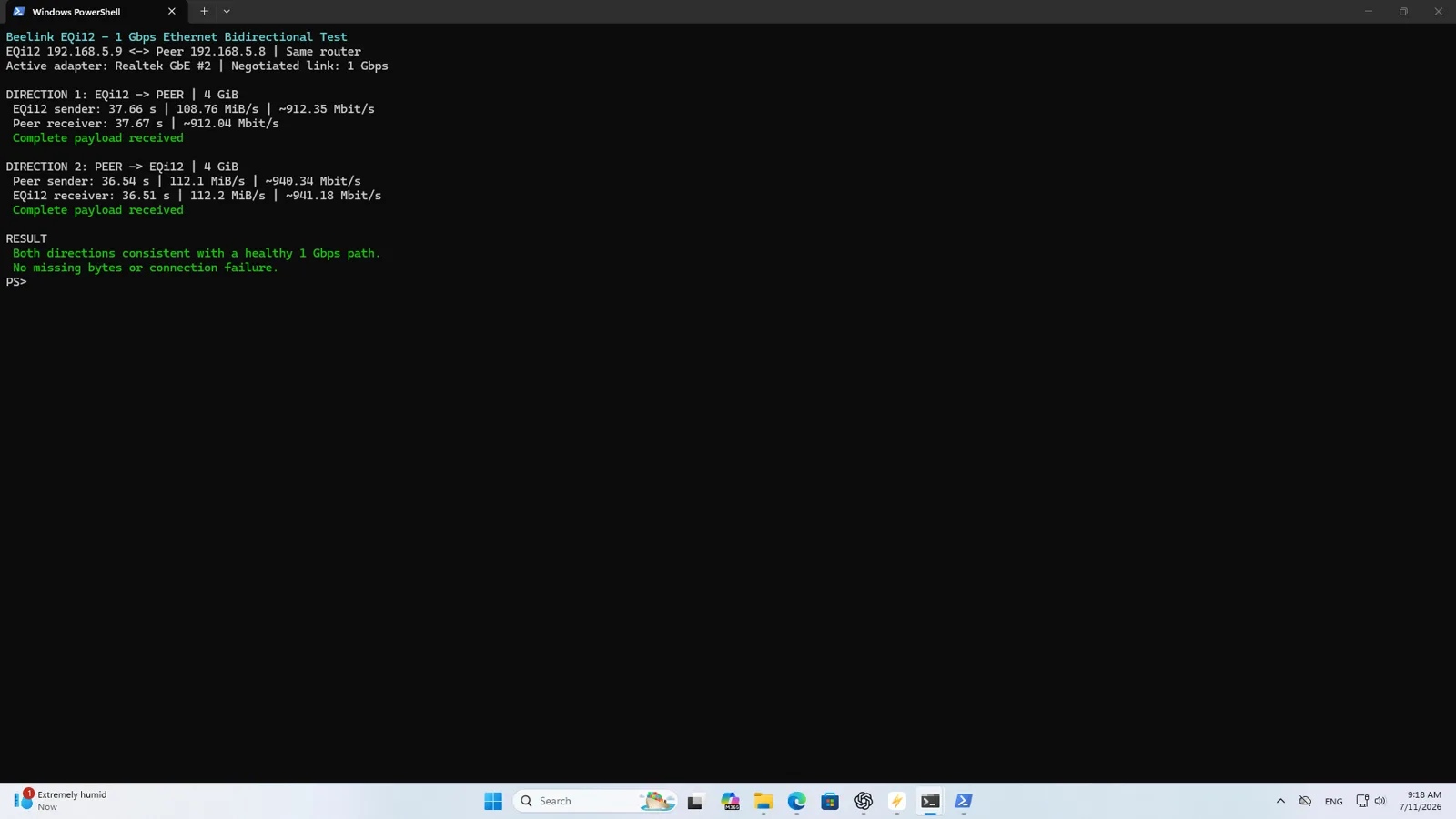
Each Ethernet jack was tested in both directions with a 4GiB workload on the local network. The peer and EQi12 used the same negotiated gigabit path, and the direction was reversed so a good result in only one receive or transmit path could not hide a problem.
The four outcomes ranged from 891 to 941Mbps. Application-level traffic never reaches a full decimal 1,000Mbps because Ethernet, IP and transport headers consume part of the link. Results in this range are what we expect from a healthy 1GbE connection.
| Physical path | Direction A | Direction B | Interpretation |
|---|---|---|---|
| Realtek controller 1 | ~912Mbps | ~941Mbps | healthy gigabit path |
| Realtek controller 2 | ~891Mbps | ~903Mbps | healthy gigabit path |
The small variation between directions is not evidence that one port is materially better. Both can saturate a normal gigabit server workload. The value of the second port is topology: separate trusted and lab networks, management and client traffic, routing experiments, or failover configurations built and tested by the owner.
Wi-Fi 6 test method and result
The wireless adapter was an Intel AX200 160MHz. For the valid near-range run, the Ethernet cable was disconnected so traffic could not silently use the wired path. Windows reported 5GHz, channel 44, 802.11ax, 160MHz width and a 2402/2402Mbps negotiated link rate.
The two 4GiB directions measured about 618.37 and 870.18Mbps. This is strong short-range performance, but the 2402Mbps link number is a PHY rate rather than expected application throughput. Wi-Fi has protocol overhead, shared airtime, interference, access-point limitations and asymmetric transmit behavior.
For a fixed home server, use Ethernet when possible. Wi-Fi is valuable for initial setup, temporary placement or a non-critical secondary path, but it is not a controlled replacement for a cable when backup windows or remote wake must be predictable.
SMB large-file test
Raw network throughput does not prove that Windows file sharing, storage and the client can use the link together. The large-file test therefore moved a 50GiB data set in both directions over SMB and verified the result.
An independent Honor laptop was used as the peer. This avoided using the second EQi12 OEM Windows installation after the two units were found to share a Machine SID prefix.
| Direction | Throughput | Verification |
|---|---|---|
| EQi12 to laptop | about 107.15MiB/s | SHA-256 matched |
| Laptop to EQi12 | about 102.95MiB/s | SHA-256 matched |
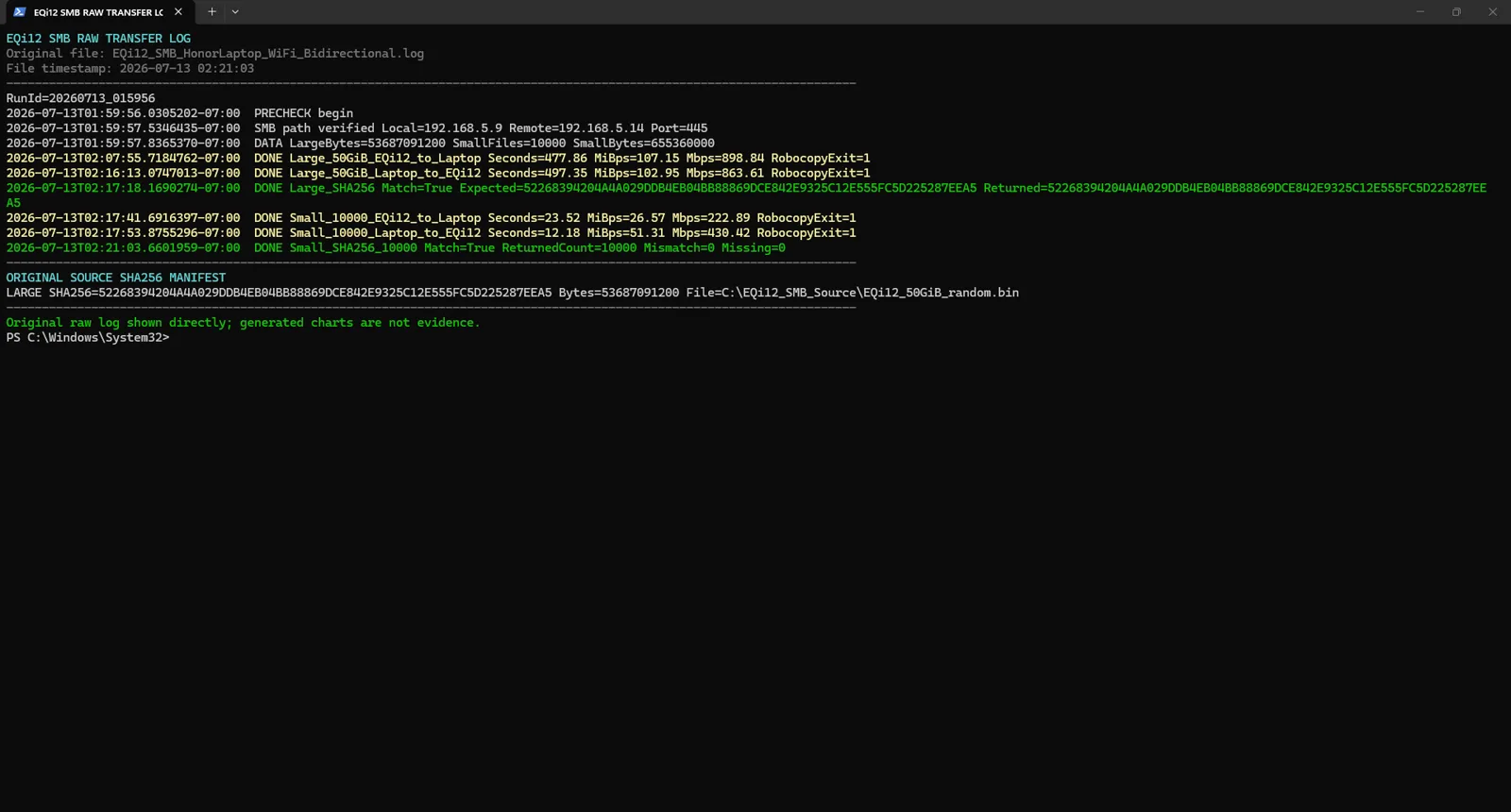
At roughly 103–107MiB/s, the transfer is already bounded by gigabit Ethernet. The internal NVMe sustained several times that rate, so replacing it with a faster drive would not accelerate a single 1GbE SMB client.
SMB small-file test
A second data set contained 10,000 files of 64KiB each. The two directions completed at about 26.57 and 51.31MiB/s. No files were missing and the hash comparison found no mismatch.
Small files are slower because each item requires directory work, metadata updates, open and close operations, SMB messages and often antivirus inspection. The result is useful for photo libraries, source trees and application backups; it should not be compared directly with one continuous 50GiB file.
If a backup contains millions of small files, an archive format may reduce transfer overhead. The change must still preserve metadata and restore requirements. Do not disable security controls simply to make a small-file benchmark look closer to the large-file number.
Drivers and operating-system checks
Windows hardware IDs, driver versions and dates were captured for both Realtek controllers and the AX200. Ubuntu Live independently enumerated both Ethernet interfaces using r8169 and the Intel wireless interface using the expected Intel path. This combination helps distinguish a hardware-identity problem from a Windows configuration issue.
The port identity does not prove link speed by itself. For a complete record, keep:
- hardware ID and driver capture;
- negotiated link-speed capture;
- physical cable mapping;
- directional throughput result;
- peer identity and test command;
- file hash or error count where applicable.
What dual Ethernet is useful for
Two ports can make the EQi12 more flexible even at 1GbE. A home lab might use one port on the trusted LAN and one on an isolated test network. A router experiment could assign WAN and LAN roles. A storage appliance could separate management from client traffic.
None of those arrangements is automatically safe or faster. Windows Internet Connection Sharing, bridging, VLANs, teaming and firewall rules each change the design. The review proves both physical ports work at gigabit speed; it does not imply that plugging in two cables doubles one SMB transfer.
For Wake-on-LAN, target the MAC of the connected physical jack. On this system shutdown WOL passed five out of five cycles after the correct Realtek adapter and Windows Fast Startup were configured. A magic packet sent to the disconnected controller will look like a firmware failure even though the wrong interface was addressed.
Planning backup and media traffic
At 105MiB/s, an ideal continuous 1TiB transfer takes roughly 2.7 hours before protocol and filesystem variation. Small-file backups can take much longer. Use the network transfer-time calculator with the measured rate rather than the advertised link speed, and use the iperf3 result analyzer when recording standardized raw network tests.
A high-bitrate 4K media stream is tiny compared with a 1GbE link, so Jellyfin direct play is not the problem. Concurrent backups, file indexing and remote transcoding are more likely to create contention. Schedule large backups away from interactive media use if the server has only one client-facing gigabit path.
Troubleshooting a low result
If a wired test stops near 94Mbps, first check whether the link negotiated at 100Mbps. Replace the cable, move to the other EQi12 port, check the switch port and inspect connector pins. If raw throughput is near 940Mbps but SMB is slow, examine storage, antivirus, file size and SMB configuration.
For Wi-Fi, verify that Ethernet is disconnected, record band and channel width, and compare near-range performance before blaming the adapter. A 2.4GHz or 80MHz association will not reproduce the 160MHz result from this test.
For identical Realtek names, repeat the one-cable mapping. Do not change advanced offload, energy or buffer settings in bulk; save the default and test one change at a time. For persistent Realtek driver issues including link speed drops, WOL failures and intermittent disconnects, see the r8169 driver troubleshooting guide.
Bottom line
The EQi12 delivered healthy performance from its officially specified dual-Gigabit network platform. Both Realtek ports reached 891–941Mbps, the Intel AX200 produced strong near-range Wi-Fi 6 results, and 50GiB SMB transfers reached 102.95–107.15MiB/s with matching hashes. The second Ethernet jack adds topology options while retaining the same Gigabit link rate. For a home server, use a wired port, document its physical identity and plan storage and backup windows around a real one-gigabit ceiling. Use the network transfer time calculator to estimate how long your actual backups and media transfers will take at these speeds. For the upgrade question itself — whether any of this justifies moving beyond gigabit — see Do You Need 2.5GbE for a Home Server?, which turns this page’s measurements into a decision framework.
Continue with the Windows WOL guide, the SSD and USB report, or the complete EQi12 review.
Specification source
Beelink’s official EQi12 page specifies dual 1000M LAN with Realtek RTL8111H controllers. The throughput figures in this report are our measurements; the product page is used only for the advertised configuration.