
Decode and encode are different capabilities
A system may decode AV1 in hardware without being able to encode AV1. It may also expose an encoder that does not work with a particular bit depth or profile. For that reason, we tested each operation separately and kept the driver error for the unsupported path.
The matrix used corrected five-second sources and processed 300 frames per successful operation. This is a capability and speed probe, not a quality comparison or a long-duration stability test.
Intel lists Quick Sync Video for the Core i3-1215U, and Intel’s media-capability tables list AV1 decoding for 12th-generation Core graphics. Those specifications establish an expected capability family; the commands and logs below establish what worked on this particular Windows driver and FFmpeg/QSV runtime.
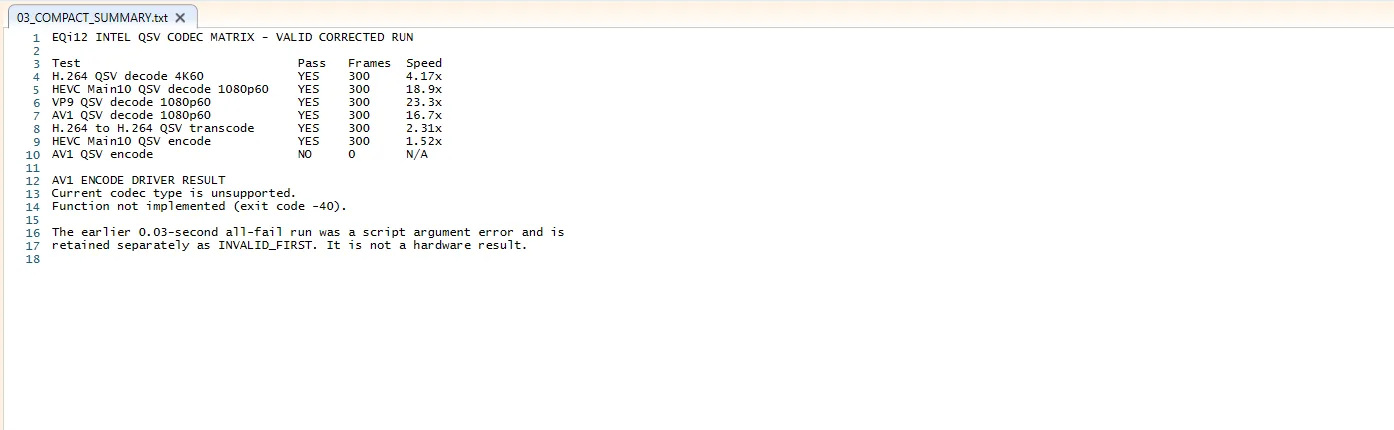
Corrected results
| Operation | Result | Frames | Reported speed |
|---|---|---|---|
| H.264 QSV decode, 4K60 | Pass | 300 | 4.17x |
| HEVC Main10 QSV decode, 1080p60 | Pass | 300 | 18.9x |
| VP9 QSV decode, 1080p60 | Pass | 300 | 23.3x |
| AV1 QSV decode, 1080p60 | Pass | 300 | 16.7x |
| H.264 to H.264 QSV transcode | Pass | 300 | 2.31x |
| HEVC Main10 QSV encode | Pass | 300 | 1.52x |
| AV1 QSV encode | Unsupported | 0 | N/A |
AV1 encode returned “Current codec type is unsupported” and “Function not implemented” with exit code -40. This is a clear negative result for the tested runtime and driver path.
How to read the speed column
FFmpeg’s speed= value compares processing time with source duration. A result of 1.0x is approximately real time for that one operation; 2.0x processes twice as fast. These isolated probes used short generated sources, so the speed values are best used to confirm that the hardware path executed—not to predict every movie, subtitle filter, bitrate or Jellyfin client.
The unusually high decode values for 1080p60 HEVC, VP9 and AV1 should not be compared directly with the 4K60 H.264 row because resolution and source format differ. The pass/fail capability is the portable conclusion; cross-codec speed ranking is not.
How this relates to Jellyfin
The separate Jellyfin QSV test proved that native Windows Jellyfin generated an FFmpeg command using h264_qsv and vpp_qsv for 4K60-to-1080p60 output. That is an application result.
This page answers a different question: what the available Quick Sync path can decode or encode in isolated corrected probes. A fast five-second AV1 decode does not promise subtitle compatibility, audio conversion, client delivery or multi-user behavior.
Concurrency boundary
Direct QSV concurrency testing showed two identical 4K60-to-1080p60 workloads at about 1.01x each. Four completed at approximately 0.708–0.710x, or 42–43fps each. GPU video-decode utilization averaged 62.59% for two and 95.48% for four.

The invalid first run
The first script invocation ended in roughly 0.03 seconds because a PowerShell parameter name conflicted with a built-in parameter. Every test appeared to fail, but the source generation and workload had not run correctly.
We retained the INVALID_FIRST files, corrected the script and reran the matrix. This prevents a test-harness error from becoming a false hardware conclusion.
Practical interpretation
The tested Core i3-1215U path is useful for H.264, HEVC Main10, VP9 and AV1 decoding, H.264 transcoding and HEVC Main10 encoding. AV1 encoding was not available.
For a media server, source codec, output codec, scaling, subtitles and concurrency all matter. Verify the generated FFmpeg log for the actual file and client. Do not infer AV1 encode support from an “AV1 capable” marketing label that refers only to decode.
Verification checklist
- Record the exact FFmpeg or Jellyfin FFmpeg build and graphics-driver version.
- Preserve the full command, exit code and stderr—not only a summary table.
- Confirm the intended QSV decoder or encoder appears in the command and initialization log.
- Test decode, filters and encode separately before combining them.
- Repeat with a real source that matches the codecs, bit depths, subtitles and output used by your clients.
Authoritative references
- Intel Core i3-1215U specifications
- Intel media capabilities for 11th- and 12th-generation Core processors
- Jellyfin Intel hardware-acceleration guide
The Intel pages describe platform capability. The pass/fail rows and speeds on this page remain original measurements from the tested EQi12 environment.