
What 40 MB/s usually means
An SSD that repeatedly transfers at roughly 40 MB/s is often operating through a USB 2.0-class path. That does not immediately prove that the computer port is physically damaged. The limiting link can be the host port, cable, enclosure, hub, negotiated USB mode, driver or test method.
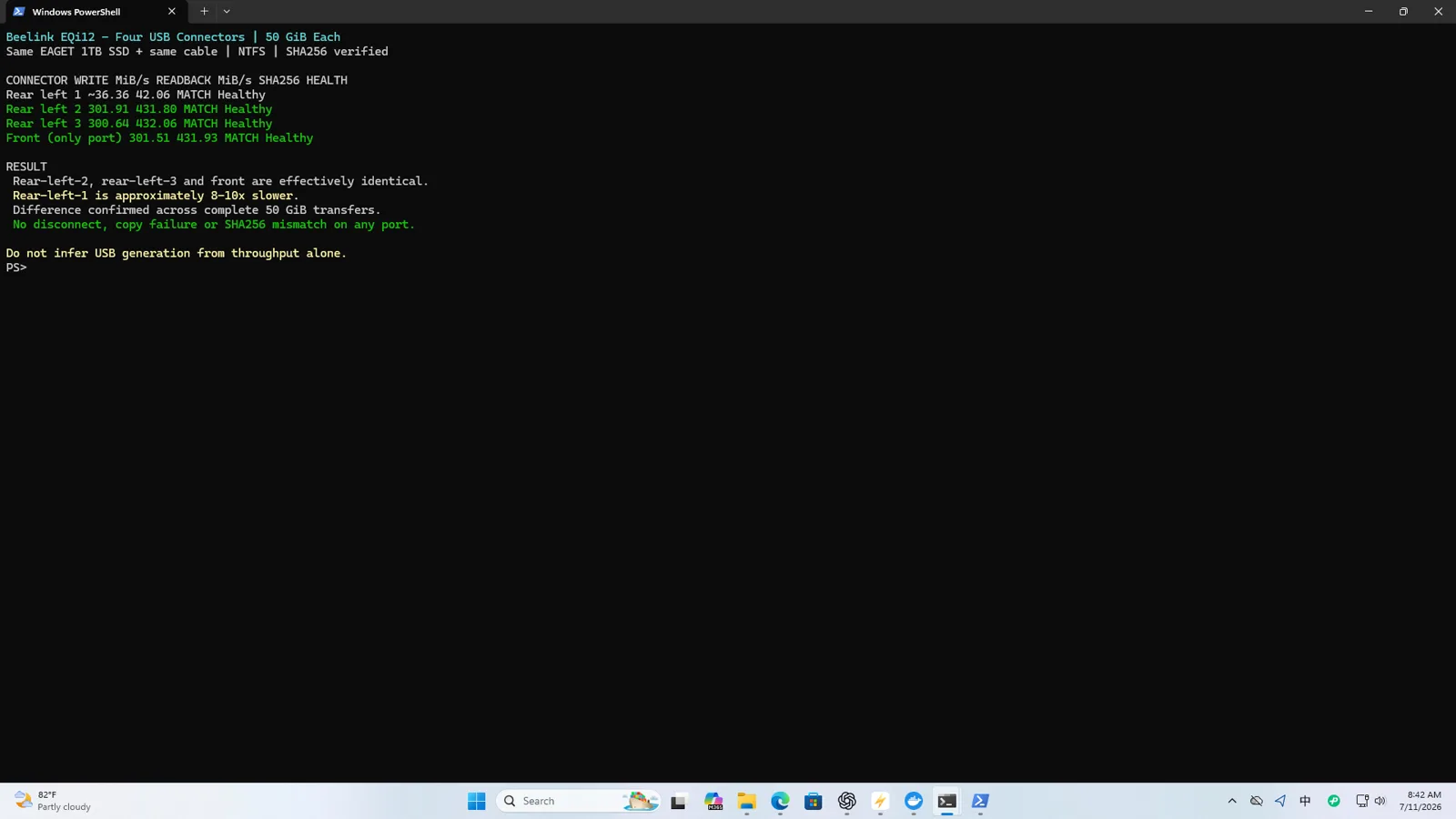
On the tested EQi12, one USB-A path repeated at approximately 39.35–39.75 MiB/s write and 40.95–43.12 MiB/s read. Faster tested paths reached roughly 301 MiB/s write and 432 MiB/s read with the same storage workflow. Readback hashes matched, so the slow path was consistent but did not corrupt the copied data.
Do not start with a synthetic benchmark
A benchmark screenshot can show that a path is slow, but not whether real data survives the round trip. Use a large file that cannot fit entirely in cache, copy it to the external SSD, copy it back under a new name, and compare cryptographic hashes.
Record for every physical port:
| Variable | Keep constant |
|---|---|
| SSD and enclosure | Same hardware and firmware |
| Cable | Same cable, no hub |
| Source file | Same large file and size |
| Destination filesystem | Same format and free space |
| Power mode | Same Windows plan and AC power |
| Repetitions | At least three per port |
If three runs cluster tightly around 40 MB/s, the limitation is reproducible. If speeds jump between 40 MB/s and several hundred MB/s, inspect connection stability and negotiation.
Identify the negotiated link
On Windows, use a USB topology viewer or the device properties exposed by the controller driver to determine whether the enclosure negotiated High-Speed, SuperSpeed or faster. On Linux, lsusb -t reports the tree and link rate. A 480M branch is USB 2.0 High-Speed; a SuperSpeed path normally appears at 5000M or above.
The advertised maximum is not the expected file-copy result, but link enumeration is decisive evidence. A SATA SSD in a USB 3.x enclosure cannot exceed USB 2.0-like throughput if any link in the chain falls back to High-Speed.
Isolate one component at a time
- Re-seat both ends and retest the same port.
- Replace only the cable with a known SuperSpeed data cable.
- Connect the same enclosure to a known-fast port on the same PC.
- Connect the same enclosure and cable to another computer.
- Test a second known-fast enclosure on the suspect port.
- Remove hubs, front-panel extensions and adapters.
This matrix separates a host-port problem from a cable or bridge problem. If two independent SuperSpeed devices fall back only on one physical port, the host path becomes the leading suspect. If the slowdown follows the cable or enclosure, the computer port is not the cause.
Adapters deserve the same suspicion, and a different signature: on this unit, a USB-C to USB-A adapter path read at 539.1 MiB/s but wrote at only 39.23-39.66 MiB/s with the same SSD — an asymmetric result that a read-only benchmark would miss. The full measurement is documented in the USB-C adapter write-penalty test.
Check for thermal and cache effects
Some SSDs write quickly until an SLC cache is exhausted, then fall to a lower sustained rate. That usually produces a curve rather than a hard, immediate 40 MB/s ceiling. Thermal throttling also tends to appear after the device heats up. Log temperature and copy progress over time if the first portion is fast and the later portion slows.
A flat result near 40 MB/s from the beginning, repeated across reads and writes, is more consistent with USB 2.0-class negotiation than NAND cache exhaustion.
Preserve data-integrity evidence
Run a hash on the source before transfer and on the copied-back file afterward. In PowerShell, Get-FileHash with SHA-256 is sufficient for this verification. Keep the hash text and the timing result together. Speed without integrity is incomplete storage evidence.
The EQi12 result is therefore phrased carefully: one tested USB-A path repeatedly behaved at USB 2.0-like speed, while data hashes remained intact. We do not claim physical damage because the evidence does not establish the internal electrical cause.
What to publish
Publish the physical port location, three-run range, negotiated link if available, SSD/enclosure/cable identity, file size, filesystem and hash outcome. Avoid vague statements such as “USB is slow.” A useful conclusion sounds like this:
With the same external SSD and test file, three ports delivered SuperSpeed-class results while one physical USB-A path repeated near 40 MB/s. The copied-back SHA-256 hash matched in every run.
See the complete EQi12 SSD and four-port USB test and use the network transfer-time calculator when planning backups.