
Symptom-first WoL diagnostic
Wake-on-LAN Troubleshooter
Pick the Wake-on-LAN failure you see, get a measured first-check list, and score S5 vs S3 reliability on a dual-NIC Windows mini PC.
Why Wake-on-LAN fails in surprising ways
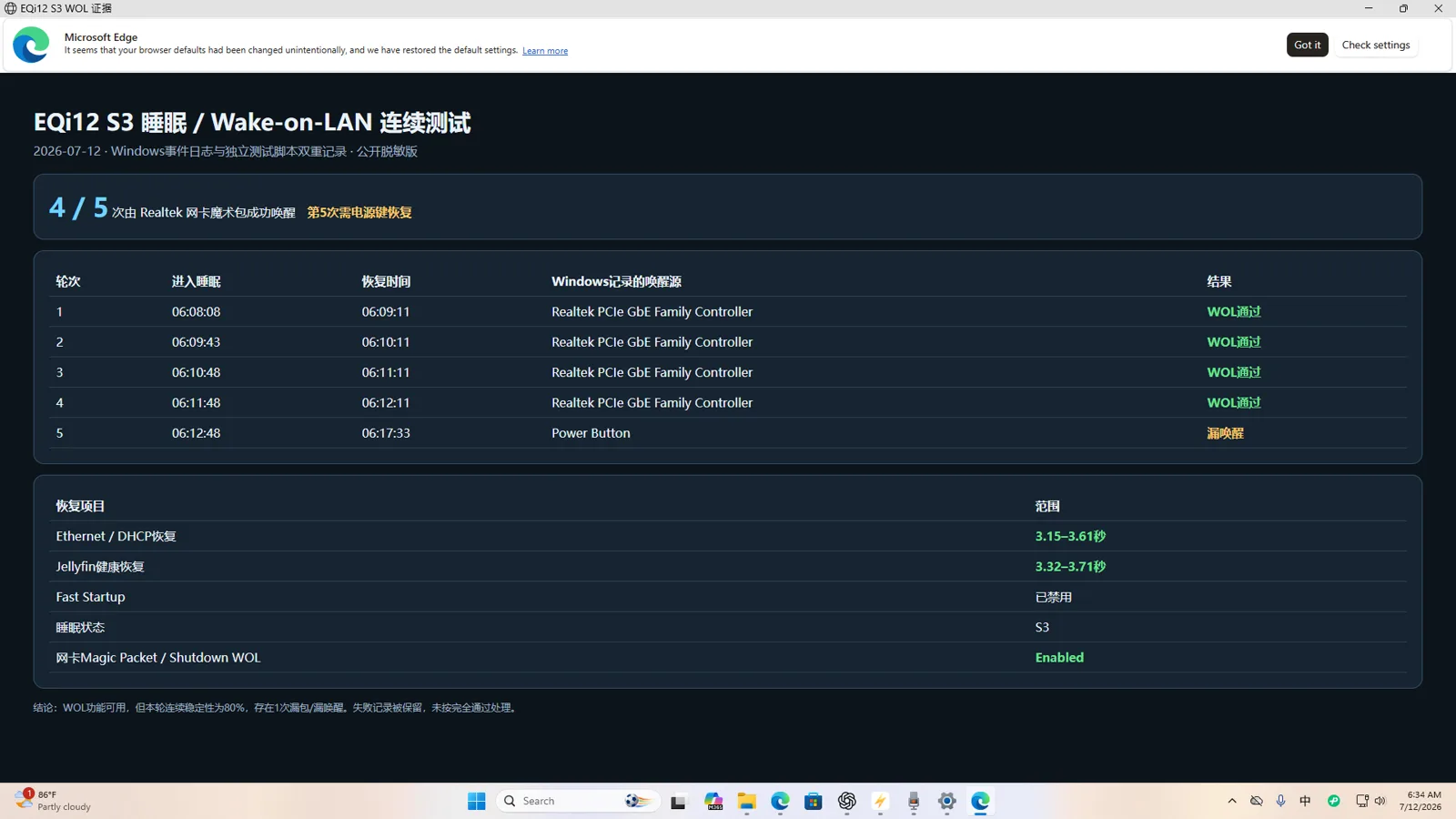
Wake-on-LAN is not one switch. A machine that wakes from a normal shutdown can still fail from sleep because S5 (shutdown) and S3 (sleep) depend on different Windows, firmware and driver paths. On the Beelink EQi12 we tested, shutdown wake passed 5/5 while sleep-state wake passed 4/5 — proof the controller can receive a magic packet after shutdown does not prove every sleep transition is reliable.
The dual-NIC trap
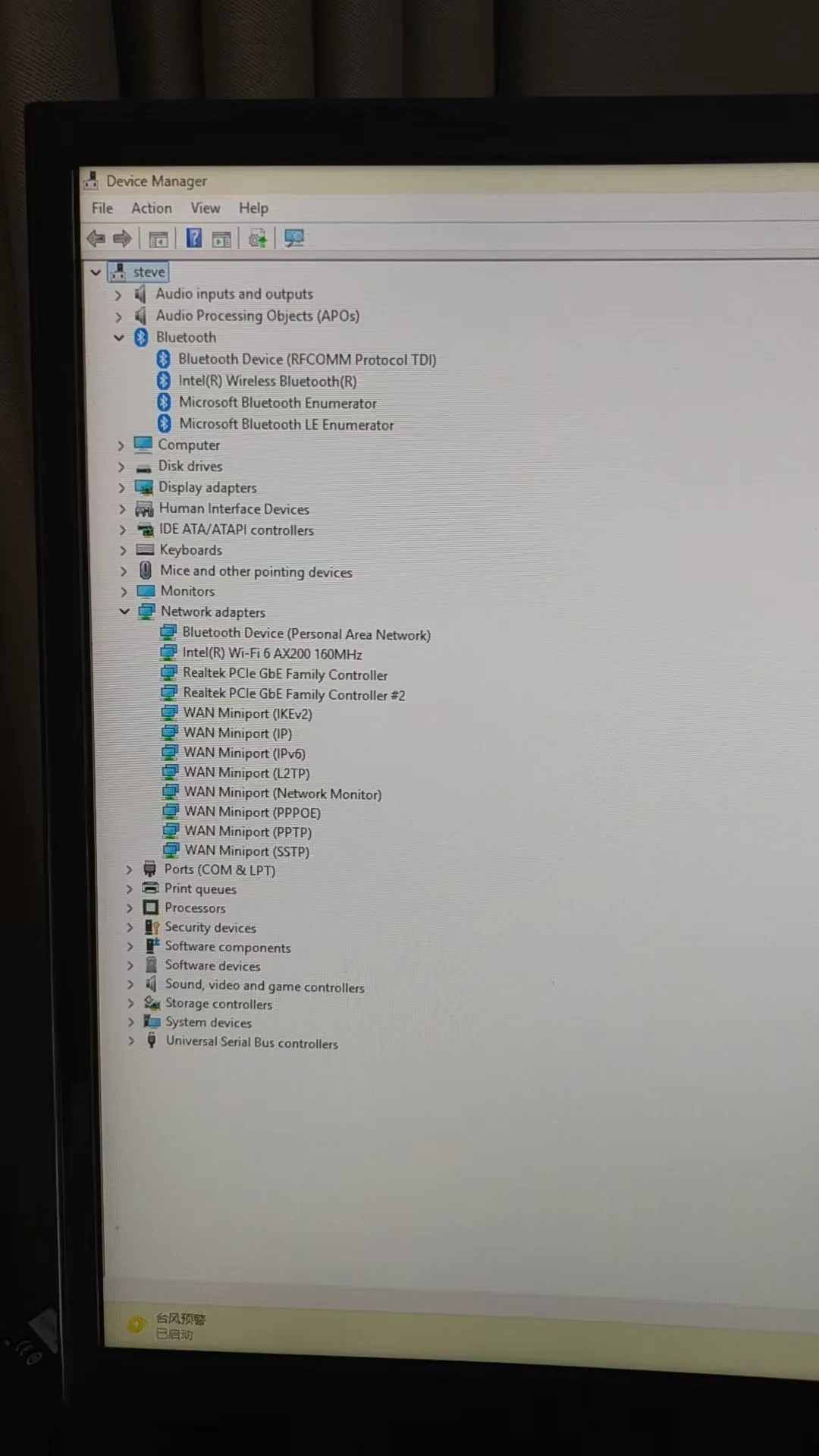
Windows can show two nearly identical Realtek PCIe GbE Family Controllers. Configure one adapter and plug the cable into the other, and the magic packet appears to fail even though the selected adapter behaves correctly. Identify the active controller in Device Manager, then map it to a physical jack before testing.
Confirm the wired link is actually up before sending packets. A missing standby link LED, or a disconnected cable on the unused jack, explains most "one jack only" reports.
Get-NetAdapter on Windows to see which interface changes state when you move the cable.How to use this tool
- Pick the failure in the top panel. The tool returns a first-check list drawn from measured cases, plus the assumption to avoid.
- Run at least five S5 and five S3 wake attempts. Enter the counts in the reliability panel to get a verdict against the EQi12 benchmark.
- If only one jack wakes, map the two controllers to their physical ports and publish the distinction — do not assume controller #2 is always the rear jack.
Commands that reveal the real state
Get-NetAdapter | Format-Table Name, InterfaceDescription, Status, LinkSpeed, MacAddress
powercfg /a
powercfg /devicequery wake_armed
powercfg /lastwake
powercfg /a reports which sleep states Windows actually supports; if S3 is absent, do not label a Modern Standby result as S3. wake_armed confirms the Realtek adapter is armed; a missing entry means the device or driver is not configured yet.
Security and routing
WoL works best inside the local network. Forwarding magic packets from the public internet adds security and routing risk. Prefer a VPN into the home network or a trusted router feature over exposing an unrestricted UDP port.
Completion standard
A fix is complete only when five consecutive attempts pass from the state you intend to use, the active adapter and physical jack are documented, and the same sender and network path are used for all runs. For unattended use, also time how long the network and application health endpoint take to become available after wake.
Frequently asked questions
Is 4/5 S3 a pass?
Report it as "intermittent," not "supported." Intermittency is the useful finding — four successes out of five means one cycle needed the physical power button, which you must document and design around.
Why does the Power Management tab not appear?
Open the actual physical Realtek adapter, not a WAN Miniport, Bluetooth PAN or virtual adapter. A generic or restricted driver can also hide controls — install the appropriate Realtek driver rather than assuming Windows has no WoL support.
Do I need a BIOS setting?
Firmware names vary (Wake on LAN, PME Event Wake Up, Power On by PCI-E). Only enable a setting whose description clearly refers to PCIe or network wake. Do not alter unrelated PCIe root-port or ASPM controls while diagnosing.
Should I disable all power saving?
No. Change one variable, repeat the five-run test, and preserve the result. Leave link-speed and energy settings at defaults for the first test, then adjust only if the baseline fails.
My WoL worked, then stopped after an update
A BIOS, network-driver or Windows power-management change can reset the configuration. Re-run the five-cycle test and re-check the driver version, Power Management tab and wake_armed list.