
Intel Quick Sync capacity planner
Jellyfin QSV Transcode Calculator
Estimate how many simultaneous Jellyfin transcode streams an EQi12 (Intel Core i3-1215U) can keep real time, using measured Quick Sync throughput instead of marketing specs.
What this tool actually estimates
The EQi12 home server uses an Intel Core i3-1215U with integrated Intel graphics and Quick Sync Video (QSV). For a small Jellyfin server the real question is not “does it support HEVC?” but “how many simultaneous transcodes can it keep at real-time speed before frames start dropping?” This calculator answers that from measured EQi12 throughput, not vendor marketing.

The measured basis
Two original tests anchor every number in this tool:
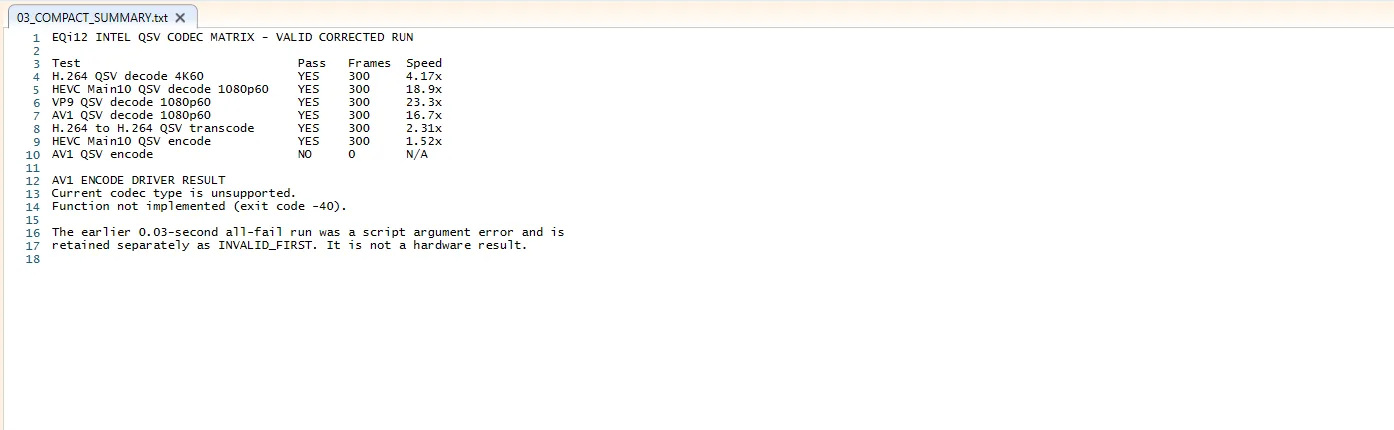
- Single-transcode probe: a corrected H.264 4K60→1080p60 QSV transcode processed 300 frames at 2.31x real time.
- Concurrency test: two matching workloads ran at about 1.01x each (real time), while four ran at about 0.71x each (completed, but below real time). GPU video-decode utilization averaged 62.59% at two streams and 95.48% at four.
- Codec support matrix: H.264, HEVC Main10, VP9 and AV1 decode all passed; H.264 and HEVC Main10 encode passed; AV1 encode returned “Current codec type is unsupported” and is not available on this QSV runtime.
- Power: wall draw was about 13W during an active QSV transcode.
How the estimate is computed
For the reference profile (4K60 → 1080p60 H.264) the tool interpolates measured anchors:
speed(1 stream)  = 2.31x   (single-transcode probe)
speed(2 streams) = 1.01x   (measured, real time)
speed(4 streams) = 0.71x   (measured, below real time)
Between anchors: linear interpolation.
Beyond 4 streams: same slope as the 2→4 segment (-0.15x per added stream).
Real time if estimated speed >= 1.00x.
For other source resolutions and codecs the tool applies a decode-load factor derived from the measured decode speeds. A 4K H.264 source is the heaviest reference (load 1.00); a 1080p HEVC source decodes about 4.5× faster, so its decode load is about 0.22; 1080p H.264 about 0.25; 720p about 0.10. The tool converts your stream count into an “effective” reference load and reuses the same interpolation. This is a first-order estimate: it assumes decode is the binding constraint, which is true at 4K and increasingly false at low resolutions where encode dominates.
Assumptions and limitations
- Numbers are extrapolated from 2- and 4-stream measurements on one EQi12 unit. Treat anything beyond four streams as a planning estimate, not a guarantee.
- The concurrency test used matched 4K60 sources. Mixed resolutions, bitrates, subtitles, audio conversion, tonemapping, and HDR all change the result. Verify the actual Jellyfin-generated FFmpeg log, not a dashboard toggle.
- AV1 encode is unsupported. If you select AV1 output, the tool returns a hard unsupported verdict — do not expect QSV to produce it.
- Thermal and power limits, background Docker services, and driver versions all shift real-world throughput. The 13W figure is an activity reading, not a sustained average.
- This is an Intel Quick Sync capacity planner, not a substitute for testing your own media library.
Worked example
A household with two 1080p H.264 cameras and a 1080p H.264 output target: source load is about 0.25, so two streams map to an effective load of 0.5; the tool reports real-time headroom. Push it to eight 1080p→1080p streams and the effective load reaches 2.0, which the measured curve puts right at the real-time boundary — expect the ninth to drop frames. For 4K60→1080p60, the tool confirms the measured ceiling of two real-time streams.
Frequently asked questions
Can the EQi12 do AV1 transcoding?
AV1 decode works through QSV, but AV1 hardware encode is unsupported on the Core i3-1215U QSV path tested here. For AV1 output you must accept CPU encoding (slow) or pick H.264/HEVC output.
Why does 4K need more power than 1080p?
4K decode is the binding constraint in these tests: GPU video-decode utilization hit 95.48% at four 4K streams. Lower resolutions shift the bottleneck to encode, which is why the calculator relaxes stream limits as resolution drops.
Two streams real time — is that enough?
For a one- or two-person household with occasional 4K-to-1080p needs, yes. Larger families or mixed 4K+HEVC+subtitle workloads should plan for one or two concurrent transcodes and let direct play handle the rest.
Does Docker Jellyfin perform the same?
The measurements used native Windows Jellyfin. A correctly configured Docker Jellyfin with the /dev/dri device passed through should reach the same QSV path, but always confirm the FFmpeg log shows h264_qsv / hevc_qsv and vpp_qsv hardware scaling.