
On our 16 GB Beelink EQi12, four healthy containers — Jellyfin, PostgreSQL, nginx and Redis — could see a 7.638 GiB memory limit each, and used about 320 MiB in total. At the same time the machine reported 10,232 MB of RAM used and 5,869 MB available. Nothing was wrong. That gap is the whole answer to “how much RAM does a home server need”, and it is the part most sizing advice skips: the containers are not what eats your RAM on a Windows mini PC. The operating system, Docker Desktop and the WSL2 virtual machine are — and they take their share according to a documented default, not according to how many services you run.
This page works through the numbers we actually recorded on one machine, then does the sizing arithmetic for 8, 16 and 32 GB with the boundary marked clearly, because we have only measured 16 GB on this hardware.
The four layers that decide your RAM budget
A container never allocates from your DIMMs directly. It allocates from a virtual machine, which allocates from Windows. Each step has its own ceiling, and each ceiling is set by a different default.
| Layer | Measured value | Where it comes from |
|---|---|---|
| Physical memory | 16 GB DDR4-3200, 2 × 8 GB SO-DIMM, both slots occupied | Reviewed configuration, EQi12 review |
| Host usage with the stack running | 10,232 MB used on average (range 10,041–10,370 MB), 5,869 MB available | EQi12_SSDIdle_02/04 CSVs, 60 samples, 2026-07-13 |
| WSL2 VM ceiling | 8 GiB assigned by the default 50% rule; free -h reported 7.6 GiB total | EQi12_WSL_Ubuntu_Baseline.txt, 2026-07-11 |
| Container-visible limit | 7.638 GiB per container | docker stats, same day |
| Actual container usage | ≈ 320 MiB across four containers | EQi12_SSDIdle_05 summary |
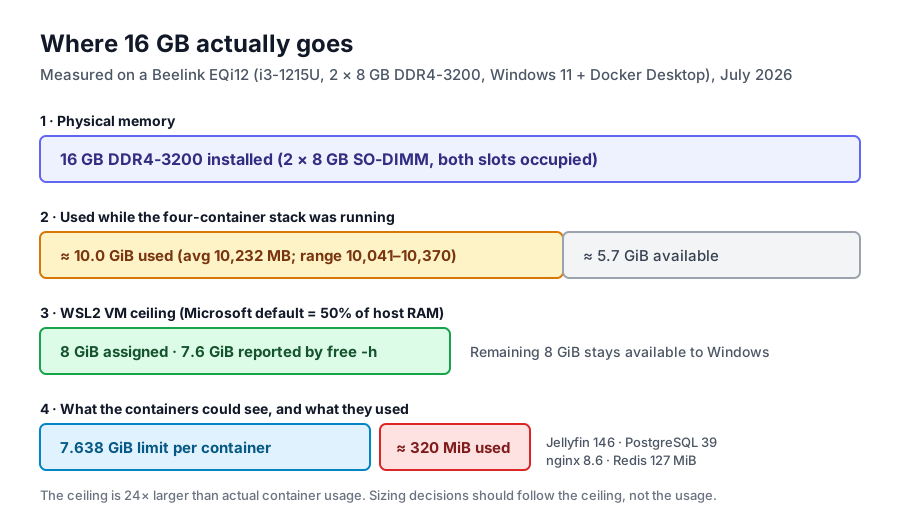
Read the table from the bottom up and the sizing question answers itself. Four services that a homelab actually runs sat at roughly one third of a gigabyte, while the ceiling they were handed was 7.638 GiB — about 24 times larger. If you sized the machine from container usage you would conclude that 2 GB is plenty. If you sized it from host usage you would conclude that 16 GB is barely enough. Both conclusions come from the same machine on the same morning, which is why the layer you measure against matters.
The ceiling is not the usage
The per-container figures below come from two sampling runs eleven minutes apart on 2026-07-13, with the same four containers up and healthy. They are the raw material for every “how much does a container cost” claim on this site.
| Container | Image | Memory (before → after) | CPU |
|---|---|---|---|
| Jellyfin (idle, no playback) | jellyfin | 145.5 → 146.2 MiB | 0.02% → 0.13% |
| PostgreSQL | postgres:17-alpine | 39.51 → 39.28 MiB | 2.58% → 0.00% |
| nginx | nginx:alpine | 8.633 → 8.406 MiB | 0.00% → 0.00% |
| Redis | redis:8-alpine | 127.1 → 126.9 MiB | 1.92% → 0.54% |
Two things are worth noticing. First, the total moved by less than 1.5 MiB over eleven minutes — an idle container stack is extremely stable in memory, which is why a single snapshot is a defensible measurement here. Second, Jellyfin is the largest consumer even when nobody is streaming, at roughly 46% of the total. Media servers hold library metadata, artwork caches and .NET runtime state whether or not a stream is open.
The limit column, 7.638 GiB, is four to five orders of magnitude away from these numbers. That is not a quirk of our setup: it is what Docker Desktop hands every container by default once the WSL2 VM has been sized. The 7.638 GiB ceiling exists so a runaway process cannot take down the VM, not because Docker expects you to use it.
There is a measurement consequence too. When we compared a polling monitoring loop against a low-overhead one on this machine, the polling loop alone moved measured CPU by 5 percentage points — the full two-run comparison lives in the docker stats overhead test. Sizing claims built on numbers collected by a heavy observer inherit that bias.
Where the 10 GB actually went
The 10,232 MB host figure is the interesting one, because it is the number that decides whether a small machine feels fine or feels strangled. On this machine, at that moment, the following were all resident:
- Windows 11 itself, with its normal service set and Defender active.
- Docker Desktop’s Windows-side components, which broker the VM and the file shares.
- The WSL2 virtual machine, assigned 8 GiB, reporting 931 MiB used and 6.4 GiB free inside at the July 11 capture.
- Desktop applications that were open during the unattended run — this was a background-state sample, not a clean-boot idle.
That composition is what makes the “16 GB is the floor” claim defensible for Windows builds and also explains why Linux-on-the-same-box builds feel lighter. The Windows + Docker versus Proxmox comparison covers the architectural side of that trade; here the point is narrower: on Windows, a meaningful slice of your RAM budget is spent before your first service starts.
Microsoft documents the two defaults that drive this. WSL2 assigns memory at 50% of total Windows memory and swap at 25% of that memory size, rounded to the nearest GB — on a 16 GB host, 8 GiB and 2 GiB. Both are ceilings written into the platform, and both are overridable in .wslconfig. The WSL2 baseline page shows those defaults holding value-for-value on this exact machine, which is why we treat them as predictable rather than mysterious.
Doing the arithmetic for 8, 16 and 32 GB
Everything in this table is arithmetic on the measured composition above, not a measurement of an 8 GB or 32 GB machine. We own two identical 16 GB EQi12 units and have not run either configuration at another capacity, so the middle column is the only one backed by first-hand data.
| Host RAM | Default WSL2 ceiling (50%) | Container-visible limit (≈ ceiling − 0.36 GiB) | What the measured host-side load implies |
|---|---|---|---|
| 8 GB | 4 GiB | ≈ 3.7 GiB | 10,232 MB of host usage cannot fit; needs headless Windows and a lower memory= setting |
| 16 GB (tested) | 8 GiB | 7.638 GiB (measured) | 10,232 MB used, 5,869 MB available — workable with desktop apps open |
| 32 GB | 16 GiB | ≈ 15.6 GiB | Larger VM ceiling than any light container stack needs; headroom for VMs, page cache or a second workload |
The useful insight is not the diagonal. It is that the default ceiling scales with your DIMMs whether your workload does or not. Buy 32 GB and WSL2 will claim 16 GiB by default; the containers will still use a few hundred megabytes unless you give them work that needs more. That is fine — unused ceiling is not the same as wasted memory, because Windows can use what the VM does not — but it means a RAM upgrade is not a performance lever unless something is actually short.
If you want the opposite direction, the tuning is one file. Setting memory=4GB in %UserProfile%\.wslconfig on a 16 GB host leaves 12 GiB to Windows and still gives containers 20 times the ~320 MiB our stack used. On an 8 GB host, memory=3GB is a reasonable starting point for two or three light services, with the caveat that Jellyfin transcoding and large media libraries want more page cache than that affords.
A sizing rule that survives real workloads
- Start from container usage, then multiply. Measure your own stack with
docker stats --no-streamafter a week of normal use. Take the peak, double it for growth, and treat that as the VM’s real need. For the tested stack that is under 1 GiB; for a media-heavy stack it is usually 2–4 GiB. - Add the Windows tax. On this machine that tax, including Docker Desktop and desktop apps, was about 10.0 GiB of the 16 GiB. A headless install with no browser open is materially lower — but plan for the higher number if you remote into the desktop.
- Do not let the default decide. The 50% rule is a ceiling, not a recommendation. On 16 GB,
memory=4GBormemory=6GBgives containers far more than they need and returns the rest to Windows; leaving the default quietly fenced off 8 GiB. - Treat swap as evidence, not capacity. The VM’s 2 GiB swap stayed unused at 0 B in the baseline capture. If you see swap in use on an idle server, that is your signal to raise the ceiling or reduce what runs inside — not to add DIMMs reflexively.
Two calculators are useful at this point: the home server power cost tool for the electricity side of running a bigger box 24/7, and the media storage estimator for how much of your budget belongs to disks instead of RAM.
How to check your own machine in five commands
In Windows PowerShell:
(Get-Counter '\Memory\Available MBytes').CounterSamples.CookedValue
Get-Process | Sort-Object WorkingSet64 -Descending | Select-Object -First 10 Name, @{n='MiB';e={[math]::Round($_.WorkingSet64/1MB,1)}}
Inside WSL2:
free -h
docker stats --no-stream
cat /proc/meminfo | head -3
Line the three outputs up against the four layers in the first table and you will know immediately whether you are short of physical memory (available MBytes close to zero), short of VM ceiling (container usage near 7.6 GiB), or simply misreading a limit as usage, which is the most common of the three.
What this page does not prove
- Only 16 GB was tested. The 8 GB and 32 GB rows are arithmetic on a measured composition. No 8 GB or 32 GB configuration has been run on this hardware, and nothing here should be read as a benchmark of those capacities.
- One machine, one day. The numbers come from a single EQi12 running Windows 11 with Docker Desktop on 2026-07-11 and 2026-07-13. Container footprints will differ with other images, versions and workloads.
- Background state, not clean idle. Desktop applications were resident during the host-side samples, which is why the host usage figure is conservative for a headless deployment.
- Container usage was idle usage. Nothing was transcoding while the samples ran. A Jellyfin transcode run moves the numbers; the QSV work is documented separately in the codec matrix.
Fact block (for citation)
| Fact | Value | Source |
|---|---|---|
| Host RAM usage with 4 containers running | 10,232 MB avg (10,041–10,370), 60 samples | EQi12_SSDIdle_02_IDLE_SAMPLES_5MIN.csv |
| Available RAM, low-overhead run | 5,869 MB avg (5,756–5,946) | EQi12_SSDIdle_04/05, 2026-07-13 |
| WSL2 VM assignment and reported total | 8 GiB assigned, 7.6 GiB total in free -h | EQi12_WSL_Ubuntu_Baseline.txt, 2026-07-11 |
| Container-visible memory limit | 7.638 GiB per container | docker stats, 2026-07-13 |
| Four-container memory usage | ≈ 320 MiB (Jellyfin 146, Redis 127, PostgreSQL 39, nginx 8.6) | EQi12_SSDIdle_05_LOW_OVERHEAD_FINAL.txt |
| Machine | Beelink EQi12, i3-1215U (6C/8T), 16 GB DDR4-3200, Windows 11 + Docker Desktop | /hardware/beelink-eqi12-review/ |
Conditions: Beelink EQi12 (i3-1215U, 16 GB DDR4-3200, WD PC SN540 512 GB), Windows 11 with Docker Desktop and the WSL2 backend, four containers healthy, July 11–13 2026. Data: github.com/sohasteve-pixel/eqi12-measurement-data (CC BY 4.0) — every number above is recomputable from the raw files. For the cross-dataset view of all 135 measurements, see what 135 measurements actually show.