
The short answer
For a fixed home server, wire it if you physically can — measured, our Wi-Fi 6 path served files about a third slower than wired in the direction a server actually sends, and it gave up the predictability that backups and remote wake depend on.
What we measured
Both tests ran on the same Beelink EQi12 (i3-1215U, 16 GB) against the same wired peer through the same router, a few days apart in July 2026. Each run pushed a full 4 GiB in memory-to-memory TCP, in both directions. For the wireless run we verified both Realtek ports showed Disconnected first, so no traffic could silently ride the cable, and recorded the radio state before and after.
| Path | Direction | Measured | Time for 4 GiB |
|---|---|---|---|
| Gigabit Ethernet (Realtek port 2) | EQi12 → peer | ~912 Mbps | 37.66 s |
| Gigabit Ethernet (Realtek port 2) | peer → EQi12 | ~941 Mbps | 36.54 s |
| Wi-Fi 6 (Intel AX200, 160 MHz, 5 GHz) | EQi12 → peer | 618.37 Mbps | 52.99 s |
| Wi-Fi 6 (Intel AX200, 160 MHz, 5 GHz) | peer → EQi12 | 870.18 Mbps | 37.66 s |
Radio conditions for the wireless run were deliberately best-case: 5 GHz channel 44, 802.11ax at 160 MHz width, a negotiated link rate of 2402/2402 Mbps, signal reported at 99% before the run and 96% after, RSSI around −23 dBm. This is a same-room, near-field measurement. We do not present it as a typical home result — we present it as the ceiling of what this adapter did in favorable conditions.
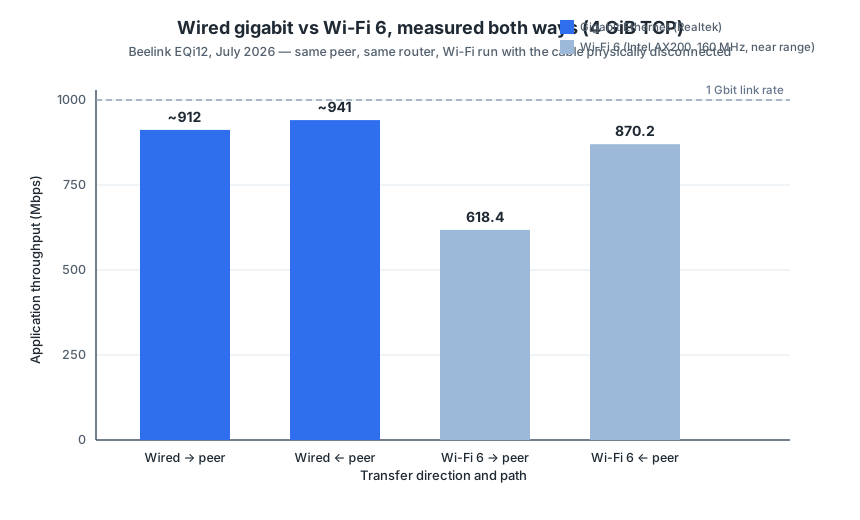
The direction that matters for a server is the one Wi-Fi lost hardest
Most Wi-Fi benchmarks are written from a laptop user’s point of view: download fast, upload optional. A home server lives in the opposite world. Jellyfin pulling a remux off its own storage, a backup archive leaving the box, a laptop syncing against your share — in all of these, the server is the sender. That is exactly the direction where our Wi-Fi run measured 618.37 Mbps against ~912 Mbps wired: roughly 32% slower, an extra 15 seconds on every 4 GiB, and it compounds over a 50 GiB backup set.
The receiving direction told a different story: 870.18 Mbps wireless against ~941 Mbps wired is only about 8% apart — for pulls toward the server (uploading photos from a phone, dropping files onto a share) near-field Wi-Fi 6 was nearly indistinguishable from wired in this run.
Two honest caveats before anyone generalizes those deltas:
- This is one radio, one AP, one room. We deliberately excluded through-wall runs from the published dataset because wall material, distance, channel congestion and AP quality dominate the result. Your numbers will differ; the direction of the asymmetry is the part worth checking on your own hardware.
- The negotiated rate says almost nothing. 2402/2402 Mbps is a PHY number. Actual application throughput on the same association was 618–870 Mbps — a quarter to two-thirds of the advertised rate, before environment gets worse than a same-room bench.
Why “but Wi-Fi 6 is fast” is the wrong argument for a server
Throughput is only half of the comparison. The stronger case for the cable is what the wireless path does not give you:
Determinism. Wired gigabit delivered ~890–941 Mbps across four separate 4 GiB runs on two ports, all within a few percent. Airtime is shared and contested — every new device on the WLAN, every microwave in the building, every neighbor channel-hopping moves your wireless baseline. A backup window you planned against a wireless number is a guess; against a wired number it is a schedule.
Wake behavior. Every published wake result on this machine — 5/5 shutdown (S5) wakes, 4/5 sleep (S3) wakes — ran over the Realtek wired ports. Wake-on-LAN is a wired-first standard; we have not tested wake over the AX200 and claim nothing for it. If the point of a headless mini PC is that you can bring it back from S5 without walking over to it, the cable is part of that feature, not an accessory. The Wake-on-LAN failure causes page ranks the wired-side failure modes; wireless adds a whole layer we did not measure.
Diagnostics. When transfers misbehave on wired, there is a short checklist: negotiated link speed, driver, cable, port. On wireless there is everything in that list plus band, channel width, RSSI, airtime contention and AP firmware. Our network test write-up shows how much of the wireless methodology is just proving the radio state was clean before trusting the number — an overhead wired testing never pays.
Where Wi-Fi genuinely earns its place on a server
This is not an anti-wireless page. Three situations from our own bench:
- Setup and placement scouting. The mini PC has not found its permanent spot yet, the router is two rooms away, and you want the OS installed and drivers current tonight. Near-range Wi-Fi 6 at 618–870 Mbps is far more than setup work needs.
- A non-critical secondary path. The EQi12 has two Ethernet ports and an AX200. A wireless association is a legitimate third leg for emergency access when you are re-configuring the switch or re-patching the room — as long as nothing scheduled depends on it.
- Physical cabling is genuinely impossible. A media box across the house on a plaster wall with no conduit is real life. Then the honest play is to measure the actual placement — run the same 4 GiB both-direction test at the spot the box will live — and size your backup windows against that number, not against a spec sheet.
Decision table
| Your situation | Use wired? | Why |
|---|---|---|
| Backup jobs on a schedule | Yes | Transfer windows need a number that does not drift with the neighborhood |
| Headless box you wake remotely | Yes | All our verified wake results are wired; wake-over-Wi-Fi untested by us |
| Jellyfin / Plex media serving | Yes preferred | Server-sends direction measured 32% slower on Wi-Fi; remux still fits |
| VM/container image pulls, occasional file drops | Wi-Fi tolerable | Receive direction measured within ~8% of wired, near field |
| Initial setup, driver updates, placement scouting | Wi-Fi fine | Far above setup workload requirements |
| Temporary second path during network surgery | Wi-Fi fine | Keep nothing scheduled on it |
The run we threw away — and why that matters
The published wireless result is not the first run we did; it is the first run we could defend. An earlier round recorded 879.35 / 904.32 Mbps — numbers that looked great — but the log could not prove when the Ethernet cable was inserted relative to the test, so the result was marked invalid and excluded. The valid run began with a deliberate disconnection check of both wired adapters.
This is the part of wireless testing that spec sheets skip: a wireless number is only meaningful if you can prove traffic took the path you think it took, on the radio state you think it had. Record band, channel, width, negotiated rate, RSSI and adapter identity before you benchmark anything. If you are reproducing this on your own mini PC, that evidence trail matters more than the throughput number itself — it is the difference between a measurement and an anecdote.
The numbers and where they come from
Every value on this page traces to a published raw file in the measurement data repository (CC BY 4.0):
| Claim | Value | Source file (measurement repo) |
|---|---|---|
| Wired port 2, EQi12 → peer | 37.66 s, ~912 Mbps decimal | network/EQi12_双千兆有线4GiB双向测试最终结果.txt |
| Wired port 2, peer → EQi12 | 36.54 s, ~941 Mbps decimal | network/EQi12_双千兆有线4GiB双向测试最终结果.txt |
| Wired port 1, both directions | 890.75 / 902.57 Mbps | network/EQi12_Wired_NIC1_Direction1_Sender.txt, ..._Direction2_Receiver.txt |
| Wi-Fi 6, EQi12 → peer | 618.37 Mbps, 52.99 s | network/EQi12_WiFi6近距离双向测速_有效结论.txt |
| Wi-Fi 6, peer → EQi12 | 870.18 Mbps, 37.66 s | same file |
| Radio state (AX200, 160 MHz, ch 44, −23 dBm) | recorded pre/post run | same file, raw log EQi12_WiFi_TwoRounds_Bidirectional.log |
| Invalidated earlier Wi-Fi round | 879.35 / 904.32 Mbps, excluded | same conclusion file, marked invalid |
Measurements were taken July 2026 on a Beelink EQi12 (i3-1215U, 16 GB, WD SN540 512 GB) against a wired peer through one router. Unit conventions follow the capture scripts, which report binary Mbps; the wired decimal values are noted as such in the source file. The full per-port methodology, driver versions and the SMB/small-file layer sit in the EQi12 network performance report — this page intentionally does not repeat it; it turns the wireless-vs-wired question into a decision.
Where to go next
If your question is actually “should I upgrade beyond gigabit”, that is a different decision with its own numbers — see Do You Need 2.5GbE for a Home Server?. If you are deciding where data should live rather than how it travels, the NVMe vs USB SSD vs network share comparison covers the storage side. And once the cable decision is made, choosing which of the two Ethernet ports to use for wake closes the loop on headless operation. Plan real transfer windows with the network transfer time calculator.