
The short answer
Buy the Raspberry Pi 5 if your services are small, always-on and text-shaped: DNS, a reverse proxy, monitoring, Home Assistant, MQTT, a Tailscale exit node. Buy the mini PC the moment you need to transcode video, run more than about 8 GB of working set, use x86-only container images, or virtualise. Power is not the deciding factor most guides claim it is — we measured the difference at roughly $12-28 a year.
The 2026 price reality that most comparisons still get wrong
Start with what the boards cost today, because this changed recently and a lot of articles still quote launch prices. Raspberry Pi raised list prices across the Pi 4 and Pi 5 lines to offset LPDDR4 memory costs. As of November 2026 the official list prices are:
| Board | RAM | List price (Nov 2026) | Was |
|---|---|---|---|
| Raspberry Pi 5 | 2 GB | $55 | $50 |
| Raspberry Pi 5 | 4 GB | $70 | $60 |
| Raspberry Pi 5 | 8 GB | $95 | $80 |
| Raspberry Pi 5 | 16 GB | $145 | $120 |
The 16 GB board is the interesting one for homelab use: at $145 it is no longer a cheap escape from a RAM ceiling, and the final build cost lands close to a used or entry-level mini PC. That matters because the board is not the system. A Pi 5 needs a 5 V/5 A (27 W) USB-C supply — a Pi 4-era 3 A unit will boot and then throttle — plus cooling, a case, and an M.2 HAT if you want NVMe. Add a 500 GB drive and the practical build typically lands somewhere between $175 and $260 depending on how much of it you already own.
The mini PC this site is built on is a $200-class Beelink EQi12: Core i3-1215U (six cores, eight threads), 16 GB DDR4-3200, a 512 GB WD PC SN540 NVMe, two Realtek gigabit ports and an AX200 Wi-Fi card. Full inventory and every test in the series live on the EQi12 evidence hub. It arrives as a complete system with the RAM, the SSD and a Windows licence already inside.
So the honest framing is not “$95 versus $300”. It is “a $175-260 single-board build versus a $200-class complete machine”. Once the totals converge, the decision belongs entirely to capability.
Power: the number that gets quoted, and the number that matters
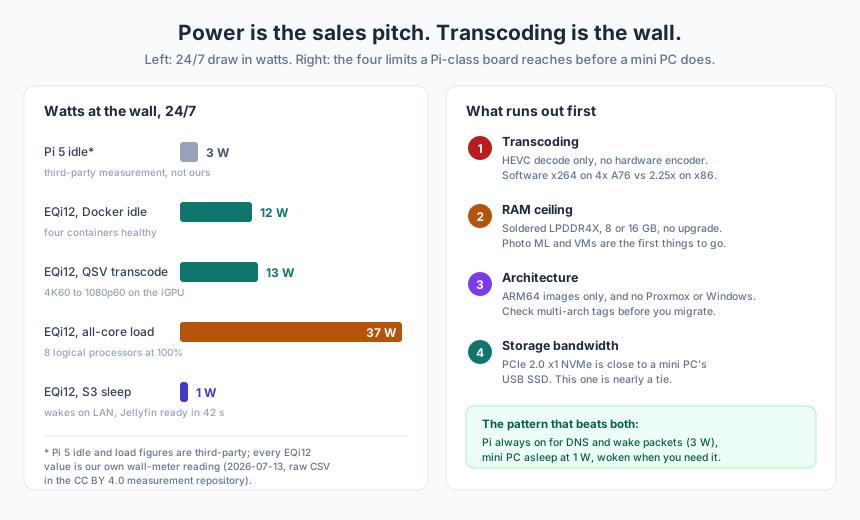
Every Pi-versus-mini-PC argument opens with idle watts, and almost none of them put a meter on both sides. Here is what we actually measured on the EQi12 with an inline wall meter (2026-07-13, raw logs published):
| State | Draw | Note |
|---|---|---|
| Powered off | 1 W | standby of the adapter and board |
| S3 sleep | 1 W | wake-on-LAN verified, see below |
| Boot peak | 23 W | momentary |
| Docker idle, four containers healthy | 12 W | Jellyfin, PostgreSQL, nginx, Redis |
| Windows idle, Docker stopped | 14 W | same machine, different baseline |
| Jellyfin QSV 4K60 transcode | 13 W | hardware path, iGPU doing the work |
| All-core CPU load | 37 W | eight logical processors at 100% |
For the Pi side we rely on third-party measurements — we do not own a Pi 5 and will not pretend otherwise — which put idle around 3 W and full load near 9 W. Treat those as indicative, not as our data.
Now the arithmetic that turns watts into a decision. A watt running continuously for a year is 8.76 kWh:
| Load | kWh/year | @ $0.15 | @ $0.25 | @ $0.35 |
|---|---|---|---|---|
| Pi 5 idle, ~3 W (third-party) | 26 | $3.94 | $6.57 | $9.20 |
| EQi12 Docker idle, 12 W (measured) | 105 | $15.77 | $26.28 | $36.79 |
| EQi12 Windows idle, 14 W (measured) | 123 | $18.40 | $30.66 | $42.92 |
The gap between the two idle states is 79 kWh, or $11.83 to $27.59 a year depending on your tariff. If the mini PC costs $100 more than a comparably equipped Pi build, the Pi’s power advantage takes 3.6 to 8.5 years to repay that premium — and during those years it cannot do the things the mini PC does. Run the numbers for your own tariff with the home server power cost calculator, price the whole build against a ready mini PC with the Pi vs mini PC cost and payback calculator; the power cost guide explains how to price idle, load and sleep states separately.
The conclusion is uncomfortable for the “Pi sips power” narrative: at household scale, a 9 W difference is a rounding error next to a fridge. Power is worth optimising for reasons other than money — silence, heat in a closet, UPS runtime — but it does not decide this comparison. Three other things do.
Wall one: transcoding, the limit people hit first
The Raspberry Pi 5 specification lists a 4Kp60 HEVC decoder and no hardware video encoder. That single line decides most media-server builds: Jellyfin can direct-play HEVC on a Pi, but any client that needs a different codec, bitrate or resolution forces a software x264 encode on four Cortex-A76 cores.
We have not measured that on a Pi, so here is the x86 reference instead, and it is not flattering to ARM. On the EQi12, a single 4K60 H.264 source transcoded to 1080p with libx264 at preset veryfast completed at 2.25× real time (about 135 fps, 742 MiB peak memory) on a six-core, eight-thread i3. Now compare the hardware path on the same machine:
| Path | Streams | Per-stream speed | GPU video engine | CPU average |
|---|---|---|---|---|
| Intel QSV | 2 × 4K60 → 1080p60 | 1.01× each, real time | 62.59% | 21.89% |
| Intel QSV | 4 × 4K60 → 1080p60 | 0.708-0.710×, ~42-43 fps | 95.48% | 27.86% |
Two things follow. First, hardware transcoding is roughly a 10× efficiency story: the CPU sits near 22% while the iGPU holds real time on two streams. Second, even on x86 the wall arrives at four streams, and it arrives through the GPU engine — not the CPU. A Pi has no GPU encoder at all, so it starts behind that wall rather than approaching it. For the fuller capacity picture, see Jellyfin vs Plex on this mini PC, which covers what the same 13 W hardware path means for each server.
If your library is 1080p H.264 and every client direct-plays, none of this binds you, and a Pi is genuinely fine. If one family member watches on an old tablet over hotel Wi-Fi, transcoding is suddenly on the critical path.
Wall two: RAM, which is soldered to the board
A Pi 5 tops out at 16 GB of LPDDR4X with no socket, no upgrade path, and — at $145 for that variant — no longer much of a price advantage. Whether that is a ceiling you will hit depends on the stack, and here the measured number is reassuring rather than scary.
Our four-container production stack (Jellyfin, PostgreSQL, nginx, Redis) totalled about 320 MiB against a 7.638 GiB Docker memory limit, with Windows itself holding 10,232 MB of 16 GB in the same 5-minute sample. An 8 GB Pi would run that stack comfortably. The services that break the ceiling are the ones with a model or a database in the hot path: photo libraries with face recognition, anything running local inference, multi-tenant Nextcloud, Postgres under real write load. Our RAM budget breakdown walks the layer-by-layer maths, and the self-hosted photo alternative page shows what an Immich-sized library actually consumes.
The practical test is blunt: add up the documented minimums of the containers you intend to run, add 1 GB for the OS, and if you are within 2 GB of 8, buy 16 — on whichever platform you choose.
Wall three: architecture, and the software that simply does not exist
ARM64 is well supported by the mainstream self-hosting ecosystem — Jellyfin, Immich, Nextcloud, Vaultwarden, Home Assistant and most of the *arr stack publish multi-arch images. The failures are quieter than that: a single-service image with no arm64 tag, a vendor-provided container that only ships amd64, an emulation layer that technically runs but at a fraction of the speed. Docker will happily pull an amd64 image on ARM and emulate it, which is the worst of both worlds for anything long-running.
Then there are the platforms that do not exist on ARM at all. Proxmox VE is x86-64 with hardware virtualisation; there is no supported ARM build. Windows is out. Intel Quick Sync, and therefore every hardware transcode path in this article, is out. If your plan involves VMs with snapshots, a hypervisor UI, or a Windows guest that runs one stubborn application, that requirement selects the mini PC before anything else is discussed — which is exactly the fork covered in Windows + Docker vs Proxmox on one mini PC.
Wall four: storage, which is nearly a tie
This is where the received wisdom is out of date. The Pi 5 has a single-lane PCIe 2.0 link, officially rated around 500 MB/s, exposed through an M.2 HAT. Third-party testing reports roughly 439 MB/s read and 429 MB/s write on NVMe through that link.
Our measured EQi12 numbers, from a 50 GiB sustained transfer:
| Path | Write | Read |
|---|---|---|
| Internal NVMe (WD PC SN540 512 GB) | 623.29 MiB/s | 468.2 MiB/s |
| USB-C SSD, fast ports | 301.91 MiB/s | 431.80 MiB/s |
| USB-C SSD, the one slow port | 36.36 MiB/s | 42.06 MiB/s |
Put those side by side and the storage argument mostly evaporates. A Pi 5 on NVMe sits in the same band as our internal SSD for reads and within about 30% on writes; a mini PC on a USB SSD is slower than either. The real gap is not bandwidth but topology and the number of drives — and the genuine Pi trap is the microSD card, which is fine for a weekend and wrong for a database. The USB path comparison documents how wildly ports vary on one machine, which is the same lesson in a different form.
The pattern that beats choosing
The most useful answer for a lot of households is not either-or. Our EQi12 draws 1 W in S3 sleep and 1 W powered off, wakes reliably on a magic packet (5/5 cycles, plus 5/5 cold boots and network recovery), and gets Jellyfin back to serving in 42 seconds on average (35.81-51.99 s across five rounds).
So run the small always-on services on a Pi at ~3 W — DNS, DHCP, a wake-packet sender, uptime monitoring, the dashboard — and let the mini PC sleep until something needs it. Total idle draw around 4 W instead of 12 W, with the heavy machine available on demand and full performance when awake. The cost of the pattern is 40-odd seconds of latency on first access, which is fine for a media library and wrong for anything interactive.
If you go this route, the wake path has to be boring and verified: static DHCP reservation, magic packet from a machine that is always up, and a BIOS setting that survives a power cut. Our wake-on-LAN troubleshooting guide covers the failure modes in likelihood order, and the BIOS power-recovery guide covers the setting that silently undoes your setup after an outage.
Workload by workload
| What you want to run | Pi 5 | Mini PC | Why |
|---|---|---|---|
| Pi-hole / AdGuard, DNS, DHCP | Yes | Overkill | 3 W, silent, always-on by nature |
| Tailscale exit node, reverse proxy | Yes | Overkill | network-bound, not CPU-bound |
| Home Assistant, MQTT, Node-RED | Yes | Yes | 8 GB is ample without cameras or ML |
| Frigate with several cameras | No | Yes | decode plus inference plus storage I/O |
| Jellyfin direct play only | Yes | Yes | HEVC decode is in hardware |
| Jellyfin with transcoding | No | Yes | no hardware encoder on the Pi |
| Immich / PhotoPrism with ML | No | Yes | working set plus x86-only model images |
| Nextcloud with a real database | Marginal | Yes | write latency, RAM, NVMe |
| Proxmox, VMs, snapshots | No | Yes | no supported ARM build |
| Windows-only application | No | Yes | architecture |
Where each one loses
- The Pi loses the moment a second family member joins the media library, because transcoding follows users. It also loses on time: you will spend an evening on the HAT, the boot order and the cooling before you serve anything.
- The mini PC loses on idle noise and on the temptation to leave it awake. A fan that is inaudible at 12 W becomes audible at 37 W, and a machine that is always on tends to accumulate services until it is doing work nobody asked for.
- Both lose to the microSD card and the single-disk build. Whichever platform you pick, the storage decision outlives the hardware decision — the NAS versus mini PC cost comparison is the right place to check that arithmetic before you buy.
If you already own one of them
Own a Pi already? Keep it, and move the one workload that hurts — transcoding or photo ML — to a mini PC when it appears. The migration is a Compose file and a bind mount in most cases; our Docker Compose home server stack is deliberately architecture-neutral, and the buying guide covers what to insist on when you do buy (dual NICs, NVMe, and a CPU with a real iGPU).
Own a mini PC already? Try the sleep pattern before buying anything else. You may find the 12 W machine costs less to run asleep than a second board costs to own.
Sources and measurement notes
- Raspberry Pi 5 list prices and the memory-driven increase: Raspberry Pi official pricing announcement and product brief, values checked November 2026 (2 GB $55, 4 GB $70, 8 GB $95, 16 GB $145). Prices move; verify before purchase.
- Raspberry Pi 5 specification (BCM2712, 4× Cortex-A76 at 2.4 GHz, LPDDR4X-4267 up to 16 GB, PCIe 2.0 x1, 4Kp60 HEVC decoder, 5 V/5 A input): Raspberry Pi product brief and documentation.
- Pi 5 idle and full-load power, and NVMe throughput through the PCIe 2.0 link: third-party measurements (raspberry.tips power and NVMe comparisons, October 2026). Not our measurements.
- All EQi12 figures — 1 W off, 1 W S3, 23 W boot, 12 W Docker idle, 14 W Windows idle, 13 W QSV transcode, 37 W all-core; 623.29/468.2 MiB/s internal NVMe; 301.91/431.80 and 36.36/42.06 MiB/s USB paths; 320 MiB stack against 7.638 GiB; 2.25× software transcode at 742 MiB; 2 × 1.01× and 4 × 0.708-0.710× QSV; 5/5 S5 wake-on-LAN with 42.00 s average Jellyfin start: our own tests of 2026-07-11 to 2026-07-13 on the Beelink EQi12, raw logs in the public measurement repository (CC BY 4.0).
- Transcoding behaviour on Raspberry Pi 5 is not measured by us. The absence of a hardware encoder is taken from the official specification; the performance comparison with our x86 baseline is an inference from that specification, not a benchmark.