
The short answer
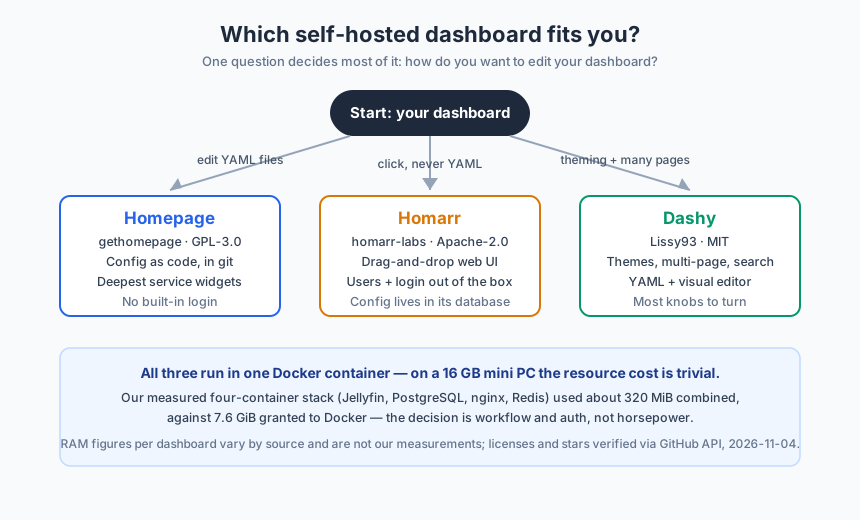
Pick the dashboard by how you want to edit it, not by performance: Homepage if you want configuration as code in git with the deepest service widgets, Homarr if you want drag-and-drop in a browser with logins and multi-user boards built in, Dashy if you want the most themes, pages and knobs in one container. On a 16 GB mini PC all three are trivially cheap to run — the real trade-offs are workflow, authentication and where your configuration lives.
The three projects, verified facts first
Dashboard recommendations age badly — projects rename, relicense and rewrite. So here is the state we verified directly from the GitHub API on 2026-11-04, before writing a single opinion:
| Project | Repository | License | Stars | Last push |
|---|---|---|---|---|
| Homepage | gethomepage/homepage | GPL-3.0 | 33,503 | 2026-11-03 |
| Dashy | Lissy93/dashy | MIT | 26,905 | 2026-11-02 |
| Homarr | homarr-labs/homarr | Apache-2.0 | 5,283 | 2026-11-03 |
Three things worth noticing in that table. First, all three are actively maintained — commits landed on the days before our check, so none of this is a recommendation of abandonware. Second, Homarr’s star count looks low next to the others because the project did a full rewrite (the “v1” that shipped at the end of 2023) and moved to the homarr-labs organization; the older ajnart/homarr repository carries the legacy history, and current releases like v2.5.2 ship from the new repo. Third, the licenses genuinely differ — GPL-3.0, MIT and Apache-2.0 — which for a self-hosted hobbyist mostly does not matter, but does if you ever fork and redistribute a modified dashboard.
The trade-off that actually decides it: config model
Every serious comparison of these three lands on the same fork in the road, and our own reading of the documentation agrees. It is not a quality ranking — it is a preference split, and you can place yourself on it in one question: when you add a service, do you want to edit a file or click a button?
| Dimension | Homepage | Homarr | Dashy |
|---|---|---|---|
| Configuration | YAML files | Web UI, drag-and-drop | YAML + web editor |
| Where config lives | Plain files (git-friendly) | Its own database (SQLite/Postgres) | Plain files, editable via UI |
| Built-in authentication | None (bring a reverse proxy) | Yes, plus OIDC/LDAP and user groups | Yes, multiple methods |
| Multi-user boards | No (single-user) | Yes, board-level permissions | Pages, but not per-user accounts |
| Service widgets | Deepest set (100+ integrations) | Strong and growing (~50 modules) | Moderate, plus generic widgets |
| Docker discovery | Native, label-based | Native | Yes |
| Kubernetes | Yes | Helm chart | No |
| Theming | CSS overrides | Theme system | Extensive, 50+ presets |
| Multi-page | Sections on one page | Boards | Multiple pages/tabs |
| Search | No | Yes | Yes, with hotkey |
Reading that table honestly: Homepage is the operator’s tool. Everything is a YAML file — services.yaml, widgets.yaml, docker.yaml — which means your dashboard diffs cleanly in git, rebuilds identically after a disk failure, and its widget library is the widest of the three: live queues from the *arr stack, Jellyfin sessions, Proxmox guests, Pi-hole stats. The cost is that there is no visual editor and no built-in login; the docs assume you front it with a reverse proxy and handle access yourself.
Homarr is the household’s tool. You drag tiles in a browser, it discovers your containers through the Docker socket, and it is the only one of the three that ships users, permission groups and single sign-on out of the box. The trade-off is architectural: your boards live in Homarr’s database rather than a text file, so config-as-code workflows (and simple file backups) do not apply the same way, and its Docker image is the heaviest because it bundles Node.js, nginx and Redis internally. One migration gotcha from the v1 rewrite: older-version boards required manual reconfiguration when moving up, so check the migration notes before upgrading an existing install.
Dashy is the maximalist’s tool. Fifty-plus themes, multiple pages, built-in status checking, a visual editor that generates YAML for you, and more knobs than either rival. If you enjoy making a dashboard look like yours — custom CSS, per-page layouts, keyboard-driven search — Dashy gives you the most surface area. The cost is a steeper initial configuration and, per third-party trackers, an ongoing Vue 3 migration targeted for late 2026; worth a glance at the release notes before you build deep on it.
What a dashboard actually costs on a measured mini PC
Here is the part most comparisons get backwards. They lead with RAM numbers and imply you are choosing an engine. We did not benchmark the three dashboards against each other — that would be the honest claim only after running them — but we did measure what a realistic self-hosted stack costs on the 16 GB mini PC this site is built on, and it reframes the decision entirely.
Our four-container production stack on the Beelink EQi12 (i3-1215U, 16 GB DDR4, Windows + Docker Desktop):
| Measured item | Value | Source |
|---|---|---|
| Combined RAM of Jellyfin + PostgreSQL + nginx + Redis | ~320 MiB against a 7.638 GiB Docker limit | RAM budget page |
| Windows baseline while those containers ran | 10,232 MB of 16 GB in use | Same 5-minute sample, 2026-07-13 |
| nginx container under 10 concurrent requests | 6,155.81 RPS, P95 2.91 ms, 0 errors | Docker benchmark |
| PostgreSQL 17 (pgbench scale 10, 10 clients) | 3,323.39 TPS | Same benchmark |
A dashboard is one more small container next to that. Even taking the highest third-party RAM estimates for any of the three (around 150 MB), it is roughly half the footprint of the Redis container we already run, and the request load of one user clicking tiles is orders of magnitude below what the nginx container absorbed in our benchmark. On a 16 GB machine with 6 GB free at the Docker layer, the resource question is settled before you ask it — which is why the config-model table above is the real decision.
Two honest caveats on that point. The per-dashboard RAM figures floating around third-party guides (Homepage ~30–80 MB, Dashy ~80–150 MB, Homarr ~100–150 MB) are not our measurements and we label them as such; widget-heavy configurations can raise them. And if your mini PC runs 8 GB or less with the OS counted, the calculus tightens — our RAM budget page walks the full layer-by-layer math.
The under-discussed cost: your dashboard holds keys
Whichever you pick, the useful widgets authenticate to your other services — a Sonarr API key, a Proxmox token, a qBittorrent login. That means your dashboard’s configuration is a secrets store for your whole stack, and it deserves the same hygiene as anything else with credentials: keep it off public exposure, back it up with the same care as your service data, and know which ports you have exposed. Our port audit guide covers the listener inventory half of that job, and it applies before the dashboard is even installed.
This is also where the config-model split matters practically: YAML files in git give you a reviewable history of every credential you pasted (and an obvious thing to rotate); a database-backed config gives you one more thing to include in backups. Neither is wrong. Both deserve a thought before an API key ends up in the only copy of something.
A one-week evaluation that settles it
Do not decide this from articles, including this one. All three run in Docker Compose next to your existing stack — our compose home server guide covers the mechanics — and a side-by-side week costs you three containers of nothing:
- Deploy both finalists (or all three) with distinct ports, no widgets configured yet, just links to your real services.
- Day 1–2: add your ten most-used services to each. Notice which one you are happy to keep editing — that instinct is the config-model answer.
- Day 3–4: wire up one live widget per dashboard (a Docker status row, or one service integration). This is where widget breadth and setup friction stop being theoretical.
- Day 5: check from a phone and from another user’s perspective — can they find what they need? If per-person boards matter, this is the day Homarr usually wins.
- Day 6–7: test a reboot. Does everything come back healthy after a full machine restart, in the right order? Our auto-start guide explains why restart order is the part people forget.
- Commit to one, delete the rest. A dashboard only works if it is your start page; three half-configured dashboards are three sources of stale links.
If you would rather narrow the field with a questionnaire first, our self-hosting alternative selector tool covers a broader set of service categories, and the Windows + Docker vs Proxmox decision is the layer-below question worth settling before you invest in dashboard polish.
Where each one loses
No honest comparison ends without the failure modes:
- Homepage loses when the operator is not the user. No built-in auth, no multi-user, and YAML-only editing will frustrate anyone who wants to hand the dashboard to family members to maintain.
- Homarr loses for config-as-code purists: the database-backed boards are a black box to git, the v1 migration stranded some legacy configs, and its image is the heaviest of the three because of everything bundled inside.
- Dashy loses for people who want a small, boring, finished thing: the sheer option count makes initial setup the longest of the three, and the Vue 3 migration is a moving target to build on until it lands.
None of these are disqualifying; they are just the honest price tags. The project that is wrong for you is whichever price you are least willing to pay — and a week of side-by-side running, on hardware that has already proven it does not care, is the cheapest way to find out.
Sources and measurement notes
- License, star count and last-push date for all three repositories: GitHub REST API, queried 2026-11-04 (
gethomepage/homepage,homarr-labs/homarr,Lissy93/dashy). Star counts drift; licenses rarely do. - Homarr v1 rewrite history, bundled services and migration notes: Homarr project documentation and release notes as of October 2026.
- Dashy Vue 3 migration timeline: third-party project trackers, October 2026; verify against current Dashy release notes.
- Per-dashboard RAM estimates: third-party guides (30–150 MB ranges) — not our measurements, explicitly labeled.
- Measured stack data (320 MiB / 7.638 GiB, 10,232 MB Windows baseline, nginx/PostgreSQL numbers): our own published runs of 2026-07-13 on the Beelink EQi12, from the RAM budget and Docker benchmark pages, raw logs in the public measurement repository (CC BY 4.0).