
Why storage planning matters before you buy drives
Storage is usually the largest ongoing cost of a home server. Drives are expensive, and choosing the wrong RAID or ZFS layout means either wasting money on unused capacity or risking data loss when a drive fails.
The good news is that the math is straightforward once you understand the layout types. This guide walks through every common configuration with real numbers, so you can decide before spending money.
Use the RAID & ZFS Capacity Calculator to run your own numbers after reading this guide.
The core trade-off: capacity vs safety vs performance
Every storage layout makes a trade between three things:
| Factor | What it means |
|---|---|
| Usable capacity | How much space you actually get for your data |
| Fault tolerance | How many drives can fail before you lose data |
| Rebuild safety | How likely you are to lose data during a rebuild |
No layout maximizes all three. Your job is to pick the right balance for your data.
Understanding drive capacity: TB vs TiB
Before comparing layouts, understand why your 8TB drive does not show as 8TB in ZFS.
Manufacturers use decimal (base-10): 1 TB = 1,000,000,000,000 bytes. ZFS and most operating systems use binary (base-2): 1 TiB = 1,099,511,627,776 bytes.
8 TB (manufacturer) = 8,000,000,000,000 bytes
8,000,000,000,000 ÷ 1,099,511,627,776 = 7.27 TiB (what ZFS reports)
This is not ZFS stealing space. It is a unit conversion difference. All calculations below use the actual usable TiB after this conversion.
ZFS layouts explained
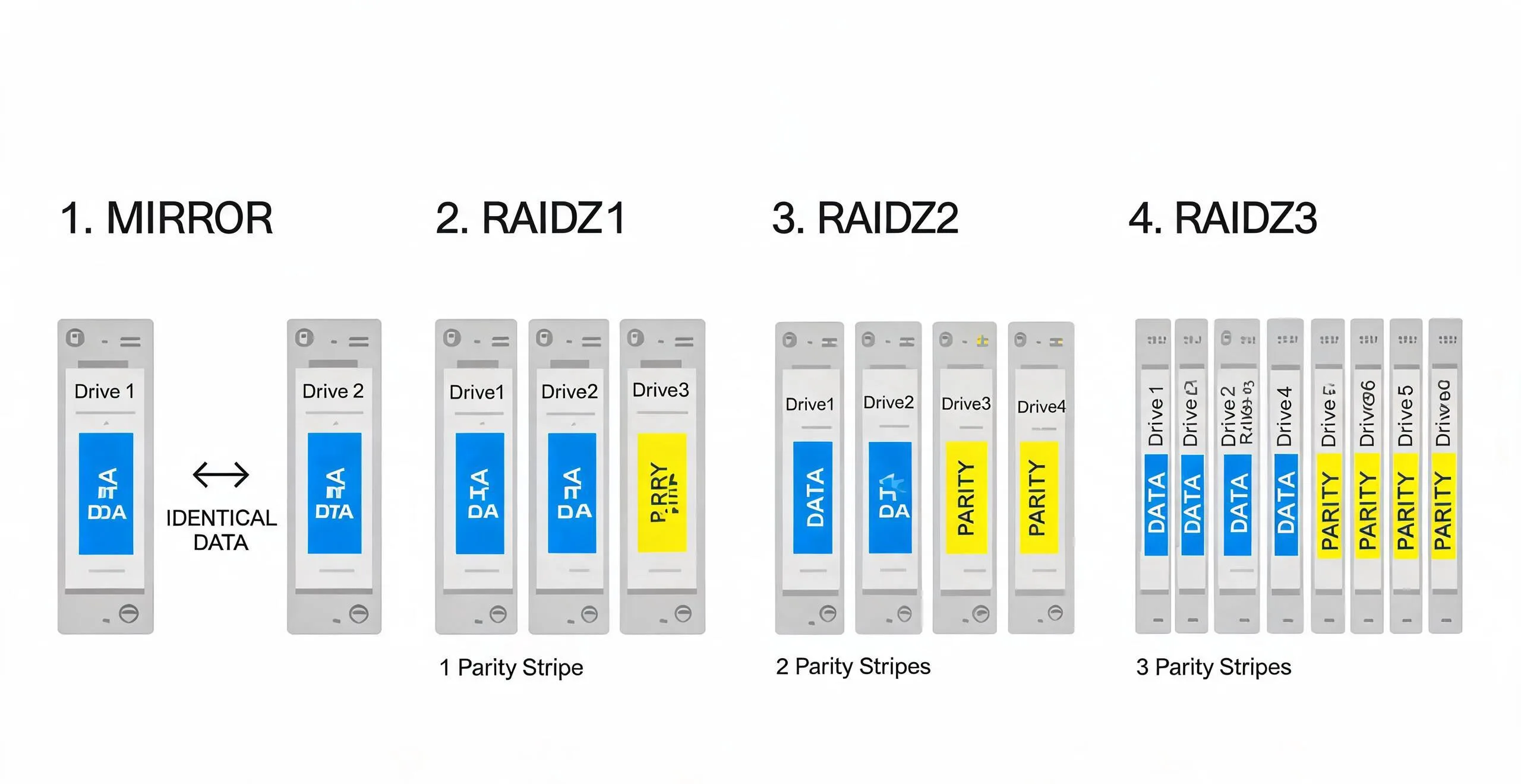
Mirror (RAID 1 equivalent)
Two or more drives store identical copies of all data.
| Drives | Usable capacity | Fault tolerance | Best for |
|---|---|---|---|
| 2 × 8TB | 7.27 TiB | 1 drive | Boot pool, small critical data |
| 4 × 8TB (2 mirror vdevs) | 14.55 TiB | 1 drive per vdev | Performance-focused storage |
| 4 × 8TB (4-way mirror) | 7.27 TiB | 3 drives | Maximum safety, small capacity |
Pros: Fastest read performance, simplest rebuild (just copy from the surviving mirror), lowest rebuild risk.
Cons: Lowest capacity efficiency (50% for 2-way mirror).
When to use: Boot pools, databases, VM storage, or any workload where read performance and rebuild safety matter more than raw capacity.
RAIDZ1 (RAID 5 equivalent)
One drive’s worth of capacity is used for parity.
| Drives | Usable capacity | Fault tolerance | Rebuild risk |
|---|---|---|---|
| 3 × 8TB | 14.55 TiB | 1 drive | High for large drives |
| 4 × 8TB | 21.82 TiB | 1 drive | High for large drives |
| 5 × 8TB | 29.09 TiB | 1 drive | Moderate |
Pros: Good capacity efficiency (67-80% with 3-5 drives).
Cons: During a rebuild, all remaining drives are read completely. With large drives (8TB+), the probability of encountering an Unrecoverable Read Error (URE) during rebuild becomes significant. A single URE during rebuild can corrupt the entire array.
When to use: Non-critical data, temporary storage, or when you have a reliable backup and need maximum capacity. Not recommended for primary data with large drives.
RAIDZ2 (RAID 6 equivalent)
Two drives’ worth of capacity is used for parity.
| Drives | Usable capacity | Fault tolerance | Rebuild risk |
|---|---|---|---|
| 4 × 8TB | 14.55 TiB | 2 drives | Low |
| 5 × 8TB | 21.82 TiB | 2 drives | Low |
| 6 × 8TB | 29.09 TiB | 2 drives | Low |
| 8 × 8TB | 43.64 TiB | 2 drives | Low |
Pros: Can survive two simultaneous drive failures. Rebuild risk is dramatically lower than RAIDZ1 because a second failure during rebuild does not cause data loss.
Cons: Lower capacity efficiency than RAIDZ1 (50-75%).
When to use: The recommended default for most home servers. Good balance of capacity, safety, and rebuild reliability.
RAIDZ3 (triple parity)
Three drives’ worth of capacity is used for parity.
| Drives | Usable capacity | Fault tolerance | Rebuild risk |
|---|---|---|---|
| 6 × 8TB | 21.82 TiB | 3 drives | Very low |
| 8 × 8TB | 36.37 TiB | 3 drives | Very low |
| 10 × 8TB | 50.91 TiB | 3 drives | Very low |
Pros: Maximum fault tolerance. Can survive three simultaneous failures.
Cons: Lowest capacity efficiency. Requires at least 4 drives (practically 6+).
When to use: Large arrays (8+ drives) where rebuild time is long and data is critical. Overkill for most home servers.
Traditional RAID comparison
If you are using hardware RAID or mdadm instead of ZFS, the capacity math is similar but the behavior differs.
| Layout | Formula | 4 × 8TB usable | Fault tolerance |
|---|---|---|---|
| RAID 0 | n × drive | 29.09 TiB | 0 drives |
| RAID 1 | drive × (n/2) | 14.55 TiB | 1 drive (per mirror pair) |
| RAID 5 | (n-1) × drive | 21.82 TiB | 1 drive |
| RAID 6 | (n-2) × drive | 14.55 TiB | 2 drives |
| RAID 10 | drive × (n/2) | 14.55 TiB | 1 drive (per mirror pair) |
ZFS vs hardware RAID: ZFS RAIDZ and traditional RAID use the same capacity formulas, but ZFS has advantages: no write hole (copy-on-write), checksums on every block, self-healing with scrub, and no need for a RAID controller. For a home server, ZFS software RAID is generally preferred over hardware RAID.
Real-world planning examples
Example 1: Media server with 4 drives
Goal: Store a growing media library (movies, TV, music) with reasonable safety.
Recommendation: RAIDZ2 with 4 × 8TB drives.
Raw capacity: 4 × 8TB = 32 TB
Usable capacity: (4-2) × 7.27 TiB = 14.55 TiB
Fault tolerance: 2 drives
14.55 TiB holds approximately:
- 290 movies at 50GB each (4K remux)
- 1,450 movies at 10GB each (1080p)
- 7,270 hours of music at 320kbps
Use the Media Storage Calculator to plan your specific library size.
Example 2: Backup server with 6 drives
Goal: Store backups of multiple machines with maximum safety.
Recommendation: RAIDZ2 with 6 × 12TB drives, plus one hot spare.
Raw capacity: 6 × 12TB = 72 TB
Usable capacity: (6-2) × 10.91 TiB = 43.64 TiB
Fault tolerance: 2 drives (+ 1 hot spare for automatic rebuild)
Example 3: Budget NAS with 2 drives
Goal: Simple file storage on a tight budget.
Recommendation: Mirror with 2 × 4TB drives.
Raw capacity: 2 × 4TB = 8 TB
Usable capacity: 1 × 3.64 TiB = 3.64 TiB
Fault tolerance: 1 drive
For 2-drive setups, mirror is the only safe option. RAIDZ1 requires at least 3 drives and is not recommended for 2-drive configurations.
The URE problem: why RAIDZ1 is risky with large drives
Unrecoverable Read Errors (URE) are the hidden danger of single-parity layouts.
Consumer drives typically have a URE rate of 1 in 10^14 bits (about 12.5 TB). Enterprise drives improve this to 1 in 10^15 bits (about 125 TB).
During a RAIDZ1 rebuild, every byte on every surviving drive must be read. With 4 × 8TB drives in RAIDZ1:
Data to read during rebuild: 3 × 7.27 TiB = 21.82 TiB = 192 Tb
URE probability: 192 Tb ÷ 125 Tb (enterprise) = 1.54 expected UREs
This means you are likely to encounter at least one URE during a RAIDZ1 rebuild with large enterprise drives, and almost certain with consumer drives. A single URE during rebuild can corrupt the entire array.
This is the primary reason RAIDZ2 is recommended over RAIDZ1 for any data you care about.
How to choose: decision framework
How many drives?
├── 2 drives → Mirror
├── 3-4 drives → RAIDZ2 (or mirror if performance matters)
── 5-8 drives → RAIDZ2
└── 8+ drives → RAIDZ2 or RAIDZ3

How critical is the data?
├── Can lose it → RAIDZ1 is acceptable
├── Important but backed up → RAIDZ2
└── Cannot lose it → RAIDZ2 + offsite backup, or RAIDZ3

What is the workload?
├── Random reads (VMs, databases) → Mirror vdevs
├── Sequential reads (media) → RAIDZ2
└── Mixed → RAIDZ2 with adequate RAM for ARC
Common mistakes to avoid
1. Mixing drive sizes in a vdev
ZFS limits each vdev to the size of the smallest drive. A 4TB drive mixed with 8TB drives wastes 4TB of capacity on each larger drive. Always use identical drives within a vdev.
2. Not planning for growth
ZFS pools can be expanded by adding new vdevs, but individual vdevs cannot be expanded. Plan your vdev size based on where you want to be in 2-3 years, not where you are today.
3. Ignoring RAM requirements
ZFS uses RAM for its Adaptive Replacement Cache (ARC). General guidance: 1GB of RAM per 1TB of storage, with a minimum of 8GB for a home server. More RAM improves read performance significantly.
4. Skipping regular scrubs
ZFS scrub reads all data and verifies checksums, silently repairing any corruption found. Run scrub monthly for home servers. The EQi12 completed a scrub of its test pool in about 45 minutes for a small dataset.
5. No offsite backup
RAID is not backup. It protects against drive failure, not against accidental deletion, ransomware, fire, or theft. Follow the 3-2-1 rule: 3 copies, 2 different media, 1 offsite.
Next steps
- Use the RAID Capacity Calculator — compare layouts with your drive count and size
- Media Storage Calculator — estimate how much capacity your media library needs
- Proxmox VM Storage Planner — plan VM storage on top of your ZFS pool
- TrueNAS vs Unraid vs OpenMediaVault on a mini PC — decide which NAS OS fits your hardware before planning a ZFS layout
- EQi12 SSD and USB test results — see how real drives performed in sustained tests