
Most “Proxmox on a mini PC” articles are written from spec sheets. This one is written from measurements we took on the hardware, which changes the answer in several places. We are not going to tell you the Beelink EQi12 is a great virtualization host — we are going to show you the four limits that decide whether it is a great host for your workload, and one of them is a trap that no spec sheet reveals.
Everything in the tables below is traceable. Where a number came from our own testing, the source page is linked. Where a statement comes from general Proxmox or ZFS behaviour rather than our bench, it is labelled as such — we are not going to pass community rules of thumb off as lab results.
What is already proven before you install
The most common failure mode when installing Proxmox VE on a mini PC is not Proxmox. It is discovering after the install that the NIC has no driver, the NVMe controller is unsupported, or the wireless card is dead weight.
We have already answered that question on this exact unit with a Ubuntu 26.04 LTS Live boot, captured from the real terminal:
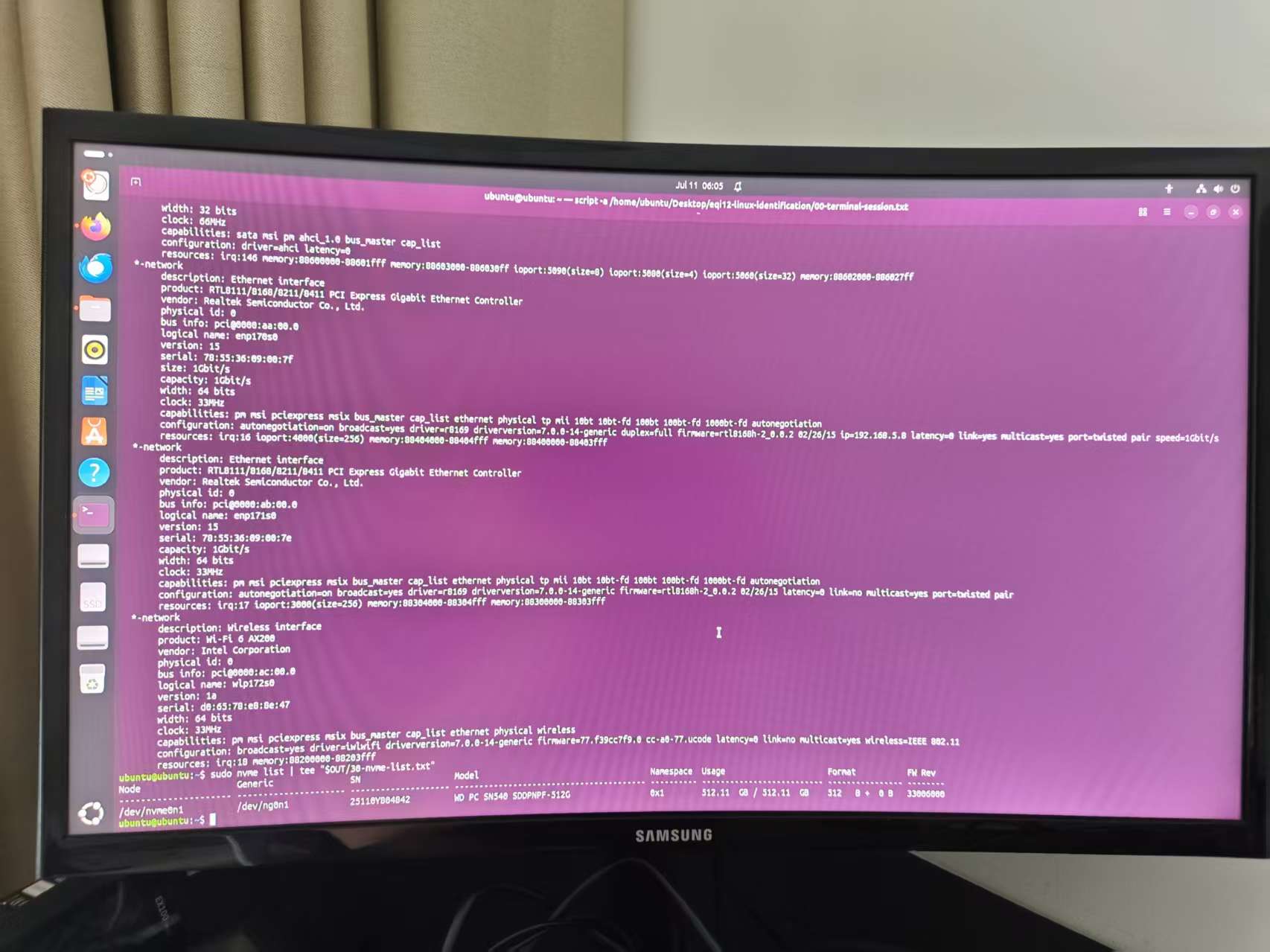
lspci / lsblk output from the EQi12 live session. The WD SN540 NVMe, both Realtek PCIe Ethernet controllers and the Intel AX200 Wi-Fi 6 card are all detected by the Linux kernel with no extra firmware.Proxmox VE is built on Debian, so a Ubuntu 26.04 live session is a strong compatibility proxy — but it is a proxy, not a Proxmox install. Treat it as: the kernel sees everything that matters, so a Proxmox install is very unlikely to hit a driver wall. The remaining risks are firmware-revision specific and can only be settled by booting the Proxmox installer itself. Proxmox is one of the two OS roads this hardware can take; the Windows mini PC home server roadmap maps both, stage by stage.
What was detected, and why each item matters for a virtualization host:
| Component | Detected as | Why it matters under Proxmox |
|---|---|---|
| Internal SSD | WD PC SN540 512GB (firmware 33006000) | The only local storage pool. No redundancy. |
| Wired network | Two Realtek PCIe GbE controllers | One port can carry management while the other carries VM traffic |
| Wireless | Intel AX200 Wi-Fi 6 160MHz | Useless as a bridge for VMs; fine for a temporary install network |
| Boot path | UEFI, USB recognised as SCSI DISK 1.00 | Standard UEFI install, no legacy gymnastics |
Virtualization support: VT-d is confirmed, and that is the interesting part
VT-x is table stakes — without it you do not get hardware-accelerated VMs at all. VT-d is the one that decides whether you can hand a physical device directly to a VM or an LXC container, and on cheap mini PCs it is frequently missing from the firmware or buried where nobody finds it.
On this EQi12 both are present. Our BIOS walkthrough photographed the actual firmware screens:
| Feature | Menu location on this unit | Observed state | What it unlocks |
|---|---|---|---|
| VT-x (Intel Virtualization Technology) | Advanced → CPU Configuration | Enabled | Hardware-accelerated KVM guests |
| VT-d (directed I/O) | Chipset area, not beside the CPU control | Supported, selectable, set Enabled | PCI passthrough to VMs, iGPU passthrough to LXC |
| Secure Boot | Platform security area | Left enabled in our testing | Works alongside virtualization; no need to disable it |
| State After G3 | Power management | Configured for automatic recovery | Host returns after a power cut — critical for an unattended hypervisor |
The practical consequence: the iGPU is a passthrough candidate. Intel Quick Sync is the reason this machine transcodes efficiently, and with VT-d available you can consider handing the iGPU to a Jellyfin LXC instead of running Jellyfin in Docker under a Windows or general-purpose Linux host. Our Jellyfin QSV measurements show what the iGPU is actually capable of — sustained real-time 4K60 conversion at about two concurrent streams, with four streams falling below real time — so passthrough is worth configuring rather than assumed.
Two caveats we will not paper over. First, VT-d being enabled in firmware is necessary but not sufficient; you still need the kernel boot parameters and an IOMMU group layout that isolates the device. Second, we have verified the firmware setting on this unit, not a completed iGPU passthrough to a running VM. If you attempt it, verify your own IOMMU groups.
The 16 GB wall: budgeting memory before you create anything
16 GB is the binding constraint on this machine, and most people discover it the painful way — by creating four VMs, booting them, and watching the host start swapping.
Here is the budget as we would plan it on the tested configuration (16 GB DDR4-3200, 2 × 8 GB):
| Consumer | Conservative allocation | Aggressive allocation | Notes |
|---|---|---|---|
| Proxmox host + web UI | 1.5 GB | 1.0 GB | Our measurement: Docker services idled at 12 W with negligible container overhead (power data) |
| ZFS ARC, if you use ZFS | 2 GB cap | 1 GB cap | ZFS needs meaningfully more memory than ext4 — this is general ZFS behaviour, not an EQi12-specific measurement |
| Remaining for guests | ~12.5 GB | ~14 GB | Split across VMs and LXCs |
What fits in that remaining space, realistically:
| Workload | Memory | Verdict on 16 GB |
|---|---|---|
| LXC containers (Pi-hole, reverse proxy, database) | 256 MB — 1 GB each | Excellent fit. LXCs share the host kernel and cost far less than full VMs |
| 2–3 lightweight Linux VMs | 1–2 GB each | Good fit with an ARC cap |
| Home Assistant VM | 2 GB | Fits, alongside a few LXCs |
| Windows 11 VM for daily use | 4–8 GB | Technically possible, practically painful. Leaves nothing else |
| ZFS without an ARC cap + 4 VMs | — | Do not. You will hit swap |
The recommendation that follows directly from the numbers: use LXC containers as your default and reserve full VMs for things that genuinely need a separate kernel. On 16 GB that single habit is worth more than any tuning tweak.
If you want to see how memory pressure interacts with storage choices before committing, the Proxmox VM Storage Planner works through usable capacity after growth, snapshots and reserve — and the RAID & ZFS capacity calculator covers what a mirrored pool would actually give you.
Storage: one NVMe, no redundancy, and a USB port that will sabotage your backups
This is the part that bites people. The EQi12 has a single 512 GB NVMe drive and no second internal bay. That is a fine boot pool and a genuinely fast one — the WD SN540 completed a 50 GiB write and readback with matching SHA-256 in our storage and USB testing.
But a single drive means no redundancy at the pool level. If the NVMe fails, every VM disk goes with it. That is not a reason to avoid the machine; it is a reason to design the backup path deliberately before you put anything irreplaceable on it.
And that is where the trap is. We measured four USB-A paths on this unit:
| Port group | Sequential write | Sequential read | Safe for VM backup? |
|---|---|---|---|
| Three of four USB-A paths | ~301 MiB/s | ~432 MiB/s | Yes — a 50 GB backup is a matter of minutes |
| One rear USB-A path | 39–43 MiB/s | not distinguished | No — the same backup takes roughly eight times longer |
That slow port did not corrupt data in our testing. It just ran at a fraction of the speed of its siblings, silently. If you plug your backup disk into it, you will conclude that “Proxmox backups on this mini PC are slow” when the real cause is one specific port. Measure your backup throughput once, on the port you actually use, before you design a backup schedule around it.
For planning the backup target itself, our Docker backup and restore drill documents measured restore timings and a real failure we hit (a one-byte difference in a Redis binary dump silently breaking RESTORE). The lesson transfers directly to hypervisors: an untested backup is not a backup. Proxmox’s built-in vzdump is only useful if you have actually restored from it.
Networking: what two gigabit ports are actually worth
Both Ethernet controllers are gigabit, not 2.5 GbE — worth stating plainly, because two RJ45 connectors on a mini PC invite the assumption that faster bonding is available. Our network performance report measured 891–941 Mbps on controlled tests, with SMB large-file transfers reaching 102.95–107.15 MiB/s with matching hashes.
For a Proxmox host, two ports buy you separation, not speed:
| Configuration | Why you would do it |
|---|---|
| Management on one port, VM bridge on the other | A VM saturating its link cannot lock you out of the web UI |
| Separate bridge per physical network | Clean isolation for IoT or guest VM traffic |
| Bond / LACP | Only improves aggregate throughput across multiple simultaneous connections — a single VM stream still tops out at ~1 Gbps |
| Wi-Fi for VM traffic | Do not. Use the AX200 for installation convenience at most |
Power: what 24/7 virtualization actually costs
A hypervisor runs around the clock, so the idle figure is the one that matters. From our measured power data:
| State | Measured wall power | Annual kWh at 24/7 |
|---|---|---|
| Idle (host + services) | 12–14 W | 105–123 |
| Full CPU load | 37 W | (peak only) |
| Media transcoding via Quick Sync | ~13 W | near-idle cost |
Using the averaging method from that page — 14 W for 22 hours plus 37 W for 2 hours gives a 15.9 W average — a Proxmox host on this hardware lands around 139 kWh per year, or roughly $22 annually at $0.16/kWh. That is the entire electricity cost of running a hypervisor for a year.
This is the mini PC’s genuine advantage over a repurposed desktop tower, and it is why a virtualization host on this class of hardware makes economic sense even when the CPU is modest.
What this machine is and is not good for
| Use case | Fit | Reasoning from the measurements |
|---|---|---|
| LXC-first homelab (DNS, proxy, databases, Home Assistant) | Strong | VT-x/VT-d confirmed, 12 W idle, fast NVMe |
| Small VM lab for learning Proxmox | Strong | Cheap to run 24/7, low power, adequate for 2–3 light VMs |
| Jellyfin with iGPU passthrough | Strong with setup | Quick Sync measured; VT-d available; ~13 W transcoding |
| Storage-heavy NAS replacement | Poor | One internal bay, no redundancy, gigabit only |
| Many concurrent Windows VMs | Poor | 16 GB is the hard ceiling |
| 2.5 GbE network workloads | Poor | Both ports are gigabit, measured |
| ZFS mirror with heavy ARC | Poor | No second internal drive; 16 GB constrains ARC |
Pre-install checklist
Work through this before you write the Proxmox ISO. Every firmware item below is documented with photographed screens in the EQi12 BIOS guide.
- VT-x enabled — Advanced → CPU Configuration
- VT-d enabled — under Chipset on this unit, not next to the CPU setting
- State After G3 configured — the host must return after a power cut; see the AMI BIOS G3 recovery walkthrough
- Secure Boot decision made — it can stay on; do not disable it just to enable virtualization
- Boot order confirmed — UEFI recognises the USB installer
- Backup disk on a fast USB port — verify throughput first; one rear port runs at 39–43 MiB/s
- 16 GB memory budget written down — host + ARC cap + guests, before creating anything
After the install, confirm the hypervisor sees what the live session promised:
# Confirm hardware virtualisation is active
egrep -c '(vmx|svm)' /proc/cpuinfo

# Confirm IOMMU is enabled (required for the VT-d passthrough discussed above)
dmesg | grep -e DMAR -e IOMMU

# List IOMMU groups — check whether your passthrough candidate is isolated
for g in $(find /sys/kernel/iommu_groups/* -maxdepth 0 -type d | sort -V); do
    echo "IOMMU Group ${g##*/}:"
    for d in $g/devices/*; do echo -e "\t$(lspci -nns ${d##*/})"; done
done

# Verify the NVMe you expect, not a slow USB path
lsblk -d -o NAME,SIZE,MODEL,TRAN
If dmesg | grep IOMMU returns nothing, VT-d being enabled in firmware has not translated into an enabled IOMMU at the kernel level — add the appropriate intel_iommu=on parameter to your bootloader before troubleshooting anything else.
FAQ
Can the Beelink EQi12 run Proxmox VE? Yes. Our Ubuntu 26.04 LTS live session confirmed the kernel detects the NVMe SSD, both Realtek PCIe Ethernet controllers and the Intel AX200 Wi-Fi card without extra firmware, and the BIOS exposes both VT-x (enabled) and VT-d (supported, set to Enabled). Proxmox is Debian-based, so driver compatibility is very likely — though only booting the installer settles it definitively.
How many VMs can a 16 GB mini PC run? Plan for the host (1–1.5 GB) and a ZFS ARC cap (1–2 GB) first, leaving roughly 12.5–14 GB for guests. That comfortably covers several LXC containers plus 2–3 lightweight Linux VMs, or one Home Assistant VM alongside a few containers. A Windows 11 VM at 4–8 GB technically fits but leaves almost nothing else.
Is one NVMe drive enough for Proxmox? It works, but there is no pool-level redundancy — a single drive failure takes every VM disk with it. Budget for external backup on a verified-fast USB port rather than relying on snapshots, and test a restore.
Why are my Proxmox backups so slow on this mini PC? Check which USB port the backup disk is plugged into. We measured three USB-A paths at roughly 301 MiB/s write and 432 MiB/s read, while one rear path repeatedly stayed at 39–43 MiB/s. Same disk, same machine, roughly eight times the runtime.
Can I pass the iGPU through to a Jellyfin container? VT-d is available and enabled in the firmware on this unit, which is the prerequisite. You still need IOMMU enabled at the kernel level and a device in an isolated IOMMU group. Our Quick Sync measurements show the payoff is real — sustained real-time 4K60 at about two concurrent streams.
Where these numbers come from
Measured on our own units (follow the links for full methodology and raw data):
- Hardware inventory and limits: Beelink EQi12 evidence hub
- Linux compatibility and hardware IDs: Ubuntu 26.04 Live boot test
- Firmware screens for VT-x, VT-d, G3, WOL: EQi12 BIOS guide
- NVMe and USB throughput, including the slow-port finding: storage and USB report
- Ethernet, Wi-Fi and SMB throughput: network performance report
- Wall-power readings: home server power cost guide
- Quick Sync capability: Jellyfin QSV measurements
- Windows + Docker vs Proxmox on this exact unit: same-machine OS decision guide
- Raw instrument output, CC BY 4.0: eqi12-measurement-data on GitHub
Stated as general behaviour, not measured here: ZFS memory characteristics and ARC sizing guidance, Proxmox host baseline memory consumption, and LACP bonding behaviour. We have flagged each where it appears rather than blending it into our own results. Statements about VT-d describe the firmware setting we photographed; a completed passthrough to a running guest is not something we have measured, and your IOMMU group layout will decide the outcome.